FastAPI Testing with Pytest: A Practical API Testing Tutorial
Test a small FastAPI shipping API with pytest. See which checks catch a wrong response, a broken threshold, and invalid input, then learn when to introduce fixtures.
Article summary
TL;DR
- Test the status and response data a caller needs. A successful status alone can hide a wrong answer.
- Choose inputs around a business boundary, and check requests the API should reject.
- FastAPI’s test client runs requests inside the Python process. This example needs no running server or database.
- Use fixtures when tests need startup, cleanup, or isolated dependencies. An async endpoint alone does not require async tests.
Code for this article
Open the repository to follow along.
artem-istranin/istranin-dev-code-examples01 / START HERE
Test what an API caller actually receives.
A shop offers free shipping on orders of 50 or more. Smaller orders cost 5 to ship. Its API accepts an order total and returns the shipping cost:
POST /shipping-quotes
Request:  {"order_total": 75}
Response: {"shipping_cost": 0}
Status:   200
Now imagine an edit changes the response field to cost. The calculation still returns 0, and the request still succeeds. But a checkout page looking for shipping_cost can no longer read the answer.
API testing checks that exchange between a caller and an application. With FastAPI and pytest, we can send a request and check the response automatically whenever the code changes.
We’ll use a small shipping API to investigate 3 risks: a changed response, a wrong free-shipping boundary, and missing or invalid input. You’ll run 5 test cases, deliberately break the application, and see which checks catch each mistake.
You need Python functions, imports, dictionaries, and a little familiarity with pytest. The beginner pytest tutorial introduces assertions and failure reports using the same shipping rule.
Run the finished example first
Use Python 3.13 or newer, Git, and uv. In a directory where you keep projects, run:
git clone https://github.com/artem-istranin/istranin-dev-code-examples.git
cd istranin-dev-code-examples/fastapi-testing-pytest
uv sync --locked
uv run pytest test_main.py -v
If you already have a checkout, enter its fastapi-testing-pytest folder instead of cloning again. Keep your terminal there throughout the walkthrough.
uv sync --locked installs the versions recorded in the example’s lockfile. They include FastAPI, pytest, and the HTTP client package used by TestClient. uv run runs commands in that environment; -v shows each test case’s name.
You should see 5 passed. The project contains main.py, test_main.py, pyproject.toml, and uv.lock. The tests and application are already complete. The snippets below explain those files; don’t paste in duplicate tests. We’ll mark the temporary edits and restore each before moving on.
This walkthrough was checked with Python 3.13.12, FastAPI 0.141.1, and pytest 9.1.1. The locked example uses httpx2 for Starlette’s test client. You don’t need to install it separately.
02 / FOLLOW A REQUEST
Follow the JSON request through the application.
Open main.py. The complete application is:
from fastapi import FastAPI
from pydantic import BaseModel, Field


class ShippingQuote(BaseModel):
    order_total: int = Field(ge=0)


def shipping_cost(order_total: int) -> int:
    if order_total >= 50:
        return 0
    return 5


app = FastAPI()


@app.post("/shipping-quotes")
async def create_shipping_quote(quote: ShippingQuote) -> dict[str, int]:
    return {"shipping_cost": shipping_cost(quote.order_total)}
The decorator @app.post("/shipping-quotes") connects a POST request at that path to create_shipping_quote(). The parameter quote: ShippingQuote tells FastAPI to read the JSON body using that Pydantic model.
The model requires order_total. Field(ge=0) means its value must be greater than or equal to 0. These are request validation rules: FastAPI checks them before calling the endpoint. See the body-field documentation for other constraints.
For this example, totals and shipping costs use whole currency units. We aren’t modeling cents, taxes, or currency conversion. The field is an integer with Pydantic’s default conversion behavior; this isn’t a strict JSON-type validation example.
A request containing {"order_total": 75} passes validation. The endpoint reads 75 from the model, calls shipping_cost(75), and returns a dictionary containing 0. FastAPI turns that dictionary into a JSON response.
A request containing {"order_total": -1} takes a different path. It fails validation and receives a 422 response. The endpoint and shipping calculation do not run for that request.
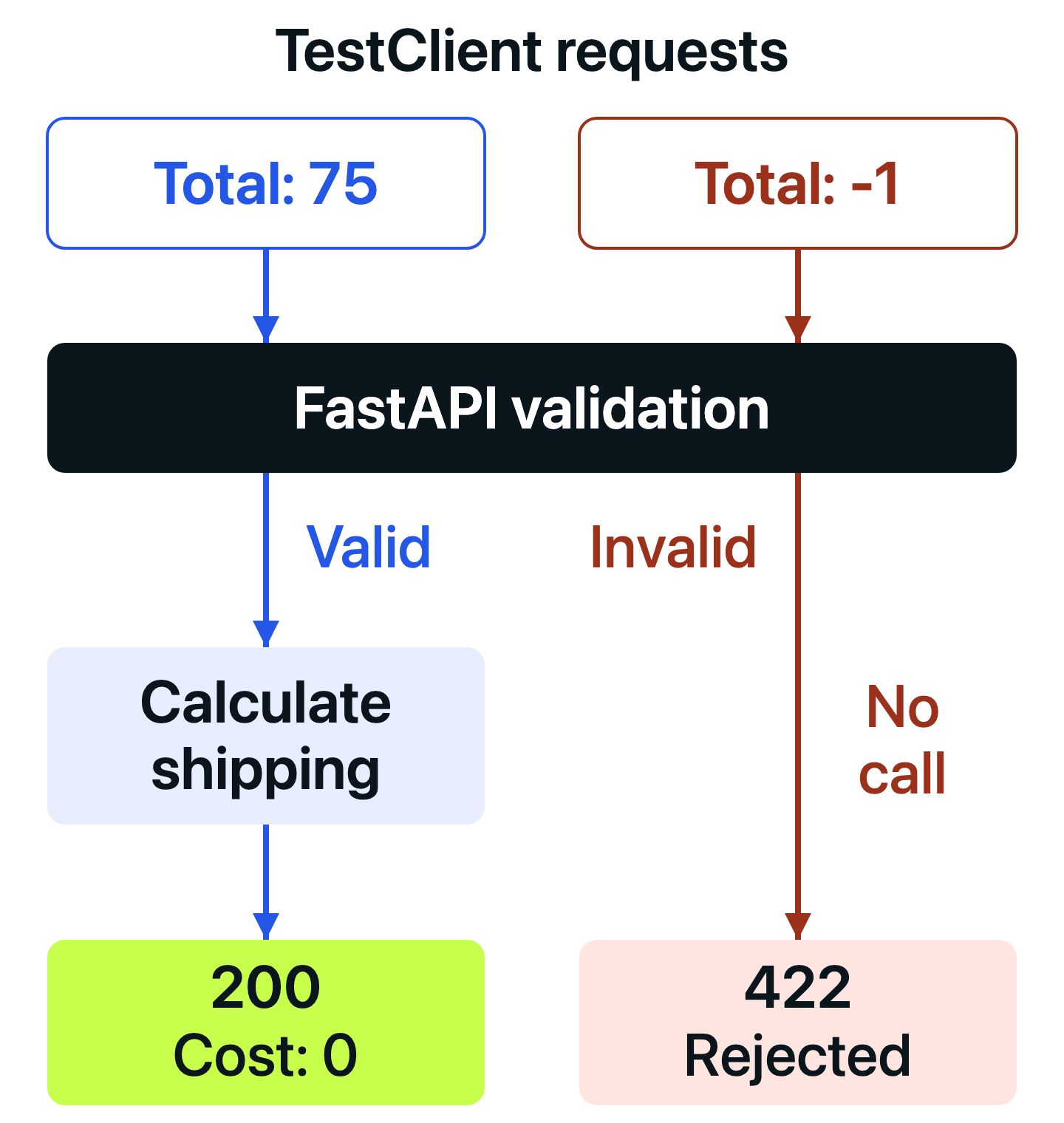
What TestClient exercises
FastAPI’s TestClient drives this request path inside the same Python process. Routing, validation, the endpoint, and response conversion all run. This example doesn’t open a network connection or require Uvicorn.
That makes the test broader than calling shipping_cost(75) directly. A function test could pass while the API exposes the wrong path or returns the wrong field name. An API test can detect those mistakes because it enters through the request interface.
It still doesn’t test a deployed server, HTTPS, or a reverse proxy. The useful question is which part of the application a test actually exercises.
Practice requests, assertions, and pytest test design in the Pytest course.
View course03 / CHECK THE RESPONSE
Check the response body as well as the status.
Open test_main.py. Its first test uses the application from main.py:
from fastapi.testclient import TestClient

from main import app


client = TestClient(app)


def test_shipping_quote_returns_free_shipping():
    response = client.post(
        "/shipping-quotes",
        json={"order_total": 75},
    )

    assert response.status_code == 200
    assert response.json() == {"shipping_cost": 0}
TestClient(app) connects the client to our application. client.post() chooses the HTTP method and path. The json= argument sends a Python dictionary as a JSON request body; response.json() reads the JSON reply back into Python data.
The assertions answer 2 separate questions:
- Did the API accept this request and return the expected status?
- Did it return the field and value the caller needs?
Run only this test:
uv run pytest test_main.py::test_shipping_quote_returns_free_shipping -v
The file name before :: identifies the test module; the function name after it selects one test. You should see 1 passed.
The endpoint uses async def, but the test uses ordinary def. TestClient handles the asynchronous application call. We don’t need await in this test.
Make the response wrong
In main.py, change only the endpoint’s return line to:
return {"cost": shipping_cost(quote.order_total)}
Leave the test unchanged and rerun the same command. It now reports 1 failed. The status assertion passes, but the JSON comparison fails:
E AssertionError: assert {'cost': 0} == {'shipping_cost': 0}
The value is still 0. The problem is the field name. A test that checked only the status would miss this change, just as a manual glance at a successful response might.
Restore the return line to:
return {"shipping_cost": shipping_cost(quote.order_total)}
Run the selected test again and confirm 1 passed.
We compared the whole JSON body because this response has 1 meaningful field. In a larger API, choose assertions around its documented promises. An exact comparison also rejects additional fields; that is useful only when an exact response shape matters. Don’t copy incidental timestamps or generated identifiers into an assertion without deciding what the caller relies on.
04 / TEST THE BOUNDARY
Find the mistake an ordinary successful request misses.
An order of 75 gets free shipping whether the code uses >= 50 or > 50. The first test cannot tell those implementations apart.
In main.py, temporarily change the comparison to:
if order_total > 50:
Keep the response field named shipping_cost. Run the first test again:
uv run pytest test_main.py::test_shipping_quote_returns_free_shipping -v
It still reports 1 passed, even though the code now charges for an order of exactly 50.
The next test in test_main.py checks the point where the behavior changes:
@pytest.mark.parametrize(
    ("order_total", "expected_cost"),
    [
        pytest.param(49, 5, id="below-threshold"),
        pytest.param(50, 0, id="at-threshold"),
    ],
)
def test_shipping_quote_handles_free_shipping_boundary(
    order_total: int,
    expected_cost: int,
):
    response = client.post(
        "/shipping-quotes",
        json={"order_total": order_total},
    )

    assert response.status_code == 200
    assert response.json() == {"shipping_cost": expected_cost}
The file already imports pytest. The decorator runs this function once for each row. A row supplies the request total and expected shipping cost; its id supplies the case label in the report.
With the incorrect comparison still in place, run:
uv run pytest test_main.py::test_shipping_quote_handles_free_shipping_boundary -v
The below-threshold case passes. The at-threshold case fails because the response contains {"shipping_cost": 5} instead of {"shipping_cost": 0}. The summary reports 1 failed, 1 passed.
The expectation comes from the shop’s rule: orders of 50 or more ship free. Restore >= 50 in main.py, then rerun the boundary test. Both cases now pass.
Together, the 3 successful-request cases cover different situations:
| Order total | Expected shipping | Purpose |
|---|---|---|
| 75 | 0 | An ordinary order above the threshold |
| 49 | 5 | The whole-number value just below it |
| 50 | 0 | The threshold itself |
Choose cases that can expose a plausible mistake. More passing inputs are useful only when they protect something different.
For a larger calculation, use focused function tests to explore many combinations and a smaller set of API tests to check delivery through the HTTP interface. Here, the boundary cases are small enough to show both the business decision and its JSON result clearly.
05 / REJECT INVALID INPUT
Verify that invalid requests never reach the calculation.
The shipping function assumes it receives a valid total. The request model supplies that boundary for our API: a total must be present and cannot be negative.
The last test in test_main.py sends both kinds of invalid request:
@pytest.mark.parametrize(
    "payload",
    [
        pytest.param({"order_total": -1}, id="negative-total"),
        pytest.param({}, id="missing-total"),
    ],
)
def test_shipping_quote_rejects_invalid_order_total(payload: dict[str, int]):
    response = client.post("/shipping-quotes", json=payload)

    assert response.status_code == 422

    errors = response.json()["detail"]
    assert any(error["loc"][-1] == "order_total" for error in errors)
Run these cases:
uv run pytest test_main.py::test_shipping_quote_rejects_invalid_order_total -v
You should see 2 passed. The requests were rejected, and that is exactly why the tests passed. A test succeeds when the observed result matches the expected behavior, including an expected error response.
FastAPI puts validation errors in the response’s detail list. Each error includes a loc, or location. In these cases, the location is ["body", "order_total"]. The expression [-1] reads its final element, and any(...) checks that at least 1 error identifies our field.
We aren’t asserting the complete error document. The wording and extra metadata belong to the framework unless our API explicitly promises them to clients. The useful behavior here is rejection with 422 and an error associated with order_total.
Check that the rule is actually enforced
In main.py, temporarily replace:
order_total: int = Field(ge=0)
with:
order_total: int
Run the invalid-request test again. The missing-field case still passes because the field is required. The negative-total case fails: -1 now reaches the endpoint, which returns 200 and a shipping cost of 5.
Restore Field(ge=0), then run the complete file:
uv run pytest test_main.py -v
All 5 cases should pass again.
This experiment checks our application configuration: did we declare and retain the constraint we need? It doesn’t require us to test every detail of Pydantic’s validation machinery. When your API defines a custom error code or response shape, add assertions for that promise as well. To trigger a dependency failure deliberately, see how to make a mock raise an exception in pytest.
06 / CLIENT SETUP
Use a fixture when the client needs a lifecycle.
The finished example creates 1 client at module level. That is enough here because the app has no startup resources or mutable application state, and the tests don’t change client cookies or headers.
When an application opens resources at startup or closes them at shutdown, manage the client explicitly. A pytest fixture can enter that lifecycle before a test and leave it afterward.
To try this optional change, replace client = TestClient(app) in test_main.py with:
@pytest.fixture
def client():
    with TestClient(app) as test_client:
        yield test_client
The file already has the required imports. Then add client to the arguments of all 3 test functions. Keep their decorators and bodies unchanged:
def test_shipping_quote_returns_free_shipping(client):
def test_shipping_quote_handles_free_shipping_boundary(
    client,
    order_total: int,
    expected_cost: int,
):
def test_shipping_quote_rejects_invalid_order_total(
    client,
    payload: dict[str, int],
):
Run uv run pytest test_main.py -v. You should still get 5 passed.
pytest sees the client argument and calls the fixture to provide it. The fixture enters the with block, yields the client to the test, then resumes afterward to close the context. With its default scope, this happens separately for each test case.
Using TestClient as a context manager also runs the application’s lifespan startup and shutdown. Our small app has no lifespan handler, so the visible responses don’t change.
A fresh client does not automatically create a fresh application or reset a database. Those resources need their own setup and cleanup. Expanding a fixture’s scope to share state can make tests depend on run order, so begin with the smallest useful scope.
You can keep this fixture version, or restore the module-level client and remove the 3 new client arguments to return to the repository version. For more on reusable setup, continue with pytest fixtures and parametrization.
07 / COMMON QUESTIONS
Common questions about FastAPI testing
The shipping example covers request handling without a database, authentication, or outbound service calls. Those dependencies introduce additional decisions. The answers below describe where to extend the approach; they aren’t extra features required to run this example.
Can pytest be used for API testing without a running server?
Yes. pytest runs the tests, while FastAPI’s TestClient sends requests directly to the application in the same process. You don’t need to start Uvicorn for this approach. A test against a deployed URL uses a network client instead and also depends on the server and network being available.
Do FastAPI tests need async def?
Use ordinary def tests with TestClient when the test only sends requests and checks responses. An async def endpoint doesn’t change that.
Use an async test when the test itself needs to await another operation, such as reading an async database after a request. FastAPI’s async testing guide shows an async client with an in-process ASGI transport. That transport connects the client to the application; it does not trigger lifespan startup and shutdown automatically, so applications relying on those events need explicit lifecycle handling.
How do I test a FastAPI endpoint that uses a database?
Give the test an isolated database or transaction with known starting data. If the endpoint obtains its session through a FastAPI dependency, replace that dependency with a test version through app.dependency_overrides.
Clean up both the data and the override after the test, including when an assertion fails. Use the production database engine when its SQL or transaction behavior matters. A different engine can hide compatibility problems. This tutorial’s application has no database, so there is no database setup to copy from it.
How can I mock an external service in FastAPI tests?
If the application obtains the service through a FastAPI dependency, override that dependency with a fake that returns a controlled result. Keep the route, request validation, and response checks real. Restore the overrides during fixture cleanup.
FastAPI’s dependency override documentation shows this mechanism. For code without an injectable dependency, a mock or patch can replace the name the application uses. Choose the replacement around the test’s purpose; a fake service does not verify the real provider’s protocol or availability.
How do I test authentication with TestClient?
Send the header or cookie your application expects, and assert its documented result for valid credentials, missing credentials, and insufficient permissions. For bearer authentication, that typically means an Authorization: Bearer ... header with credentials created for the test.
When testing unrelated business behavior behind authentication, you can instead override the current-user dependency with a known test user. That skips authentication, so keep separate tests for authentication itself. Restore the override afterward.
Why does TestClient raise an exception instead of returning 500?
TestClient raises unhandled server exceptions by default so the test shows the underlying Python error. If the behavior you need to check is an error handler’s HTTP response, create the client with raise_server_exceptions=False for that test and assert the response. The TestClient reference documents this option. It doesn’t repair the application error or change the expected result of our validation tests.
08 / NEXT STEP
Keep the checks that explain what went wrong.
We tested the same shipping API at 3 points: the response a caller reads, the boundary where shipping becomes free, and the input rules that reject invalid requests.
Each deliberate mistake produced different evidence. Renaming a response field broke the JSON assertion while leaving the status correct. Changing >= to > escaped the first test but failed at exactly 50. Removing the nonnegative constraint allowed a request the API should reject.
Before finishing, check that main.py again uses shipping_cost as the response field, >= 50 as the comparison, and Field(ge=0) on the request model. Run uv run pytest test_main.py -v and confirm 5 passed.
For your own endpoint, choose one useful successful request, one decision boundary, and one input it should reject. Write down the expected response before running the test. Add database fixtures, dependency overrides, or async execution when the behavior you are testing requires them.
Build on these API tests with fixtures, mocking, and automated test runs in the Pytest course.
View courseMore field notes
Keep reading.
Pytest Fixtures and Parametrization Best Practices
Reuse pytest setup without hiding what each test checks. Follow an inventory example through fixtures, parameter tables, failures, and fresh test data.
pytestPython testingUnit Testing vs Integration Testing vs E2E: Python Examples
Follow one Python converter through unit, integration, and end-to-end tests. Break its calculation, configuration, and output to see why each boundary matters.
Python testingpytestGitHub Actions Python Testing: A Complete pytest CI Guide
Run pytest automatically on GitHub pull requests. Start with 5 local tests, add reports and checks for supported Python versions, then block failing merges.
pytestGitHub Actions