Pytest for Beginners: Write and Run Your First Python Test
Write your first pytest test for a shipping rule, learn to read a failure, and catch a bug that a passing test misses. Follow each step in a small Python example.
Article summary
TL;DR
- An automated test records an expected result and checks it whenever you rerun the code.
- A failed assertion shows a disagreement. Use the requirement to decide whether the code or the expectation is wrong.
- A passing example can miss a bug. Test the exact point where a rule changes, as well as an ordinary case.
- Finish with 3 shipping tests and a repeatable way to investigate failures in your own Python code.
Code for this article
Open the repository to follow along.
artem-istranin/istranin-dev-code-examples01 / FIRST TEST
Turn a shipping rule into a check you can rerun.
A shop offers free shipping on orders of 50 or more. Smaller orders cost 5 to ship. You write a Python function for that rule, try an order of 75, and get 0 back. So far, so good.
Now someone changes the comparison from “50 or more” to “more than 50”. Your order of 75 still gets free shipping. An order of exactly 50 does not. Trying the function once was useful, but it did not check the whole rule.
This guide to pytest for beginners will help you turn that rule into an automated test, read a failure, and add the example that catches this mistake. You will finish with 3 tests you can rerun whenever the function changes.
You need to understand Python functions, imports, and simple comparisons. We will introduce the testing ideas as we use them. The application code and tests fit in 2 Python files.
We will build the example from an empty folder. The companion linked above contains the finished version for comparison. If you already cloned it, use a separate folder for this walkthrough so the tests we add later do not appear before their explanation.
What is pytest?
pytest is a Python testing framework that finds test functions, runs them, and reports their results. A test records an expected behavior and checks whether the code meets it. Python’s built-in assert statement performs the check; pytest organizes the run and explains failures.
02 / SETUP
Install pytest and give it a function to test.
Use Python 3.13 or newer, a text editor, and uv. uv manages the example’s Python environment and dependencies. That keeps pytest separate from packages used by your other projects.
Open a terminal in the directory where you keep your projects and run:
uv init --bare first-pytest-test
cd first-pytest-test
uv add --dev pytest
uv run python -m pytest --version
The first command creates a project folder. --bare keeps it minimal, without a generated sample application. The second command enters that folder. uv add --dev pytest installs pytest as a development tool and records the dependency.
The last command should print a pytest version. This walkthrough was verified with Python 3.13.12 and pytest 9.1.1. In every command below, uv run selects this project’s environment, and python -m pytest runs pytest using its Python interpreter. You do not need to activate an environment separately.
Keep this terminal in first-pytest-test for the rest of the walkthrough. Create shop.py and test_shop.py in your editor, alongside the generated pyproject.toml:
first-pytest-test/
  shop.py
  test_shop.py
  pyproject.toml
  uv.lock
uv also manages a .venv directory. We will edit only the 2 Python files; the other files describe or contain the environment.
Put this complete function in shop.py and save it:
def shipping_cost(order_total):
    if order_total >= 50:
        return 0
    return 5
Read it against the shop’s rule. If the total is at least 50, return a shipping cost of 0. Otherwise, return 5. For this small example, totals are valid, nonnegative whole numbers in the same currency. Rounding and invalid input are outside the rule we are testing.
The expected answers come from that rule: an order of 75 ships free, an order of 49 costs 5, and an order of exactly 50 ships free. We will start with 75 and return to the other values after we can run and understand a test.
At this point, pytest is installed and the function exists. We have not written any checks yet. The official pytest getting-started guide uses the same small starting point: ordinary Python code and an assertion.
Prefer a guided walkthrough? Practice your first tests in the Pytest course.
View course03 / WRITE THE TEST
Write your first Python test with pytest and assert.
Our first test will check that an order of 75 gets free shipping. Put this complete code in test_shop.py and save it:
from shop import shipping_cost


def test_shipping_is_free_for_large_orders():
    order_total = 75

    cost = shipping_cost(order_total)

    assert cost == 0
The import makes the function from shop.py available to this file. The test then chooses an input, calls the function, and checks its result. Those 3 steps are often called Given-When-Then, or Arrange-Act-Assert:
- Given: an order total of 75.
- When: we calculate its shipping cost.
- Then: the cost should be 0.
The blank lines separate those steps for the reader. pytest does not require them. What matters is that the test describes a clear situation and the result we expect.
Look closely at assert cost == 0. The == compares 2 values. If they agree, execution continues. If they do not, Python raises an AssertionError, and pytest reports the failed check. We are asking the computer to make a decision we would otherwise make by inspecting printed output.
There is no import pytest here because assert belongs to Python. pytest supplies the test runner and the failure report. It does not require a special assertion method for this comparison.
The test_ prefix lets pytest find the function. The rest of the name describes the expected behavior: shipping should be free for a large order. When a report shows this name, we know which expectation needs attention.
We deliberately write the expected answer as 0. Repeating the shipping calculation inside the test could reproduce the same mistake in both places. The test should state the answer promised by the requirement, then ask the real function to produce it.
We now have an executable example of the rule for an order of 75. Let’s run it and see how pytest reports that result.
04 / RUN PYTEST
Run pytest and read the result.
From the folder containing both Python files, run:
uv run python -m pytest -v
The -v option asks for verbose output so we can see the test’s name. The relevant lines should look like this; version information, spacing, and timing may differ:
collected 1 item

test_shop.py::test_shipping_is_free_for_large_orders PASSED
“Collected 1 item” means pytest found 1 test to run. PASSED means that test finished successfully. In our case, shipping_cost(75) returned 0, so assert cost == 0 was true.
The part before :: is the file. The part after it is the test function. This identifies a particular test when a project eventually has many of them.
pytest found our test through its default naming conventions. test_shop.py matches test_*.py, and the function name starts with test_. Filenames ending in _test.py also work, but following 1 consistent convention is enough here.
The command we just used searches for tests from the current directory. To run only this file, give pytest its path:
uv run python -m pytest test_shop.py -v
Both commands currently run the same test. The explicit path becomes useful when you have other test files and want to focus on one area.
We have confirmed 1 example: 75 produces 0. That is real evidence about the function, but it says nothing yet about an order of exactly 50. Before expanding the cases, we need to recognize what a failed assertion looks like.
05 / READ FAILURES
Read a pytest failure and find the wrong expectation.
Keep shop.py unchanged. In test_shop.py, change only the final line of the existing test from assert cost == 0 to:
assert cost == 5
Keep that line indented inside the function. The input is still 75. We have deliberately written an expectation that disagrees with the free-shipping rule.
Run the file again:
uv run python -m pytest test_shop.py -v
The test is now marked FAILED. In the failure report, find these lines:
>       assert cost == 5
E       assert 0 == 5
The line beginning with > points to the failed assertion in our test. The next line substitutes the actual value of cost: the function returned 0, but we asked for 5. The summary reports 1 failed.
Read that mismatch against the requirement. The order total is 75, and orders of 50 or more ship free. The implementation returned the correct answer. This time, the mistake is in our test.
Restore the last line to assert cost == 0, save the file, and run the same command again. The result should return to 1 passed.
Changing an expectation was appropriate because we could explain why it was wrong. In ordinary work, a failure might instead reveal a bug in the function or an unclear requirement. The report identifies a disagreement; it does not decide which side is correct.
A useful way to read a failure is to ask:
- Which scenario failed?
- What value did the code produce, and what did the test expect?
- Which answer follows the requirement?
Then correct the cause and rerun the check. Avoid changing code and expectations together while investigating; doing so makes it harder to explain why the result changed.
We have now watched an assertion detect the wrong expected answer and confirmed the recovery. Next, we will make the function wrong while leaving this test correct. That will reveal a different limit: a passing test only checks the example it actually runs.
06 / TEST THE BOUNDARY
Catch a bug that the first passing test misses.
Make sure the first test again expects 0. Now change only the comparison in shop.py from >= 50 to > 50:
def shipping_cost(order_total):
    if order_total > 50:
        return 0
    return 5
Run the existing test:
uv run python -m pytest test_shop.py -v
It still passes. Why? Our only test uses 75, and 75 is both greater than 50 and greater than or equal to 50. That input cannot distinguish the correct rule from this broken version.
An order of exactly 50 can. The current function returns 5 for it, even though the shop promised free shipping. This is a boundary: a point where the expected behavior changes.
Leave the incorrect > 50 comparison in place for the next run. Append these 2 tests to test_shop.py, below the existing test. Keep the import and first test as they are:
def test_shipping_costs_five_below_free_shipping_threshold():
    assert shipping_cost(49) == 5


def test_shipping_is_free_at_threshold():
    assert shipping_cost(50) == 0
These shorter tests still follow Given-When-Then. Each literal supplies the input, the function call performs the operation, and assert checks the result. Separate variables are useful when they improve clarity, but they are not required.
Run the same file again. This time the relevant results are:
test_shop.py::test_shipping_is_free_for_large_orders PASSED
test_shop.py::test_shipping_costs_five_below_free_shipping_threshold PASSED
test_shop.py::test_shipping_is_free_at_threshold FAILED
The summary reports 1 failed, 2 passed. The new failure contains:
E assert 5 == 0
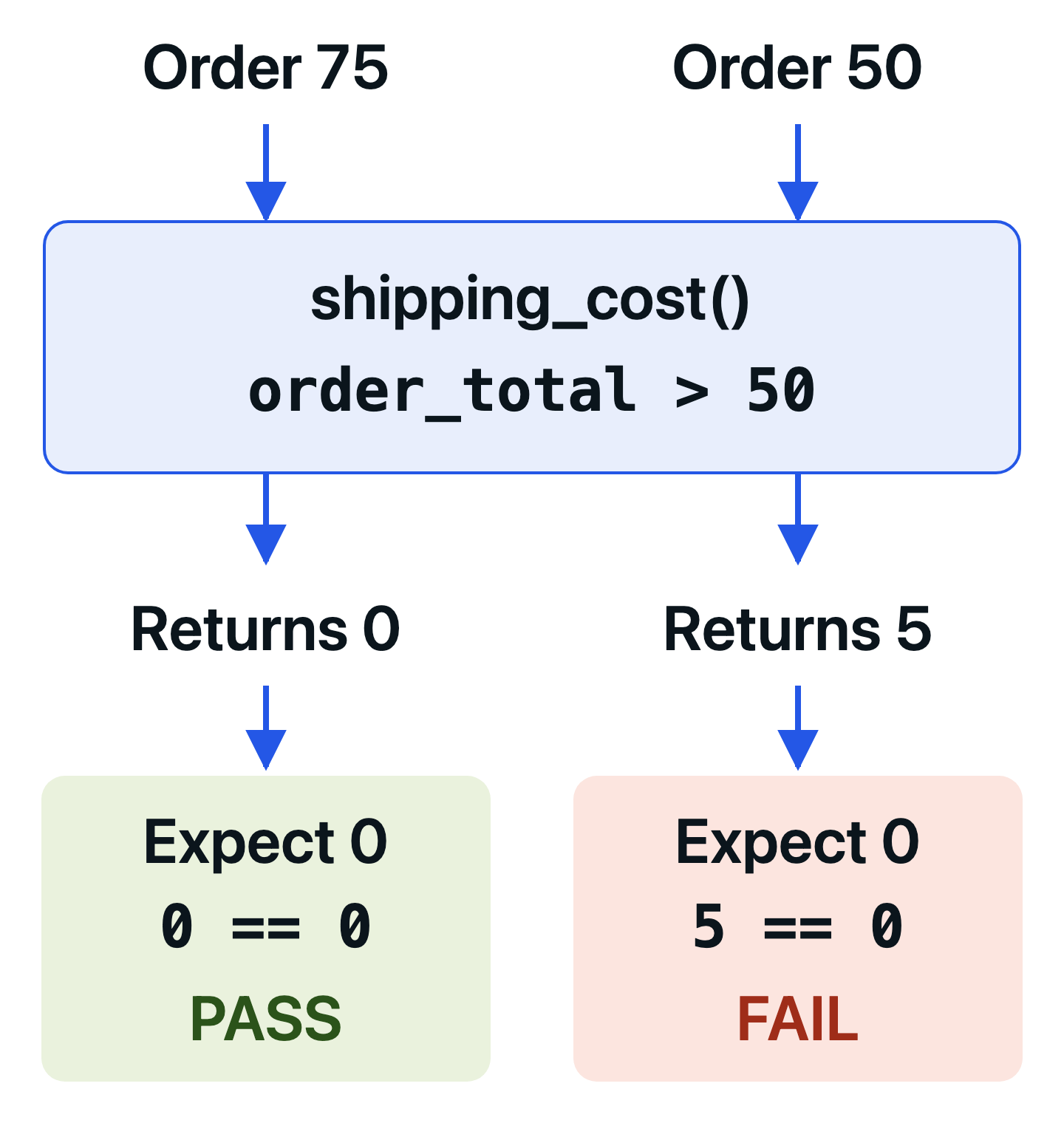
For an order of 50, the function charged 5 while the test expected 0. This expectation matches the requirement, so the fix belongs in shop.py. Restore >= 50, save the file, and run:
uv run python -m pytest test_shop.py -v
Now all 3 tests pass. We changed the implementation back; the expectations stayed fixed.
To run just the boundary test while working on this rule, use its file and function name:
uv run python -m pytest test_shop.py::test_shipping_is_free_at_threshold -v
That command reports 1 passed. It is the same test, selected on its own. Run the full file after a fix as well, so you check the other cases too.
Each example in our small suite has a purpose:
| Order total | Expected shipping | What it checks |
|---|---|---|
| 75 | 0 | An ordinary order above the threshold ships free. |
| 49 | 5 | An order below the threshold still pays for shipping. |
| 50 | 0 | The threshold itself is included in free shipping. |
The whole-number assumption makes 49 the value just below 50 in this example. A function that accepts cents would need cases chosen around its own smallest relevant amount.
Choose test inputs that distinguish correct behavior from plausible mistakes. A passing example only protects the case it actually checks.
We did not need dozens of random totals. We needed an example that exposed the difference between > and >=. When testing your own code, look for decisions such as limits, empty inputs, or allowed ranges, then choose cases that could reveal a wrong result.
These tests are now regression tests too: after a later edit, they can tell us whether these shipping behaviors changed. They cannot prove that every possible input is handled correctly. Their value comes from the specific promises they protect.
07 / BEGINNER QUESTIONS
Clear up the questions that come with a first test.
Why does pytest say “no tests ran”?
pytest did not discover a test in the location you asked it to search. Check that you saved test_shop.py, that its test functions start with test_, and that your terminal is in first-pytest-test.
Try the explicit command uv run python -m pytest test_shop.py -v. A “file or directory not found” message points to the path or working directory. A file that exists but collects no tests points you toward its names or contents. These are different from a failed assertion: the shipping check has not run yet.
Why can pytest import shop.py in this example?
shop.py and test_shop.py are in the same directory, and we run python -m pytest from there. That invocation adds the current directory to Python’s import path, allowing from shop import shipping_cost to find our file.
If you see ModuleNotFoundError: No module named 'shop', check the filename and current directory first. Save both files together as shown in the setup. The pytest invocation documentation explains this behavior.
Do I need to import pytest in every test file?
No. Ordinary Python code and plain assert need no pytest import. Import pytest when you use one of its features, such as pytest.raises to check an expected exception or pytest.mark.parametrize to run a test with several sets of values.
Our 3 tests remain separate because their names make each case easy to follow. Parametrization can be a useful next step when several cases perform the same operation; it is not required to test this rule.
Is testing a function with pytest unit testing?
The shipping tests are unit tests: they check a small piece of behavior directly, without a real database, network service, or other external dependency. pytest can also run integration and API tests; using pytest alone does not determine the kind of test.
Should every Python function have a separate test?
No. Start with behavior that matters to a caller, rather than a rule that every function needs its own test. The shipping threshold deserves protection because getting it wrong changes what a customer pays. A helper already exercised through that behavior may not need another test that repeats the same evidence.
What should a beginner know before using pytest?
pytest is installed separately from Python. If you can write a function and compare values, you can learn its basic testing loop. The naming conventions take a little practice, and a test runner cannot choose useful cases for you. Our original test passed even with the wrong shipping threshold.
Features such as fixtures, which prepare reusable test data, can help as a suite grows. Introduce them when they solve a problem you have. The first useful skill is still choosing an example, checking its result, and explaining a failure.
08 / NEXT STEP
Use the same loop on one behavior in your own code.
We started with a shipping rule and recorded 1 expected result. Then we saw 2 different mistakes: a wrong expectation that failed immediately, and a wrong comparison that passed until we added the missing boundary case.
Your finished shop.py should use >= 50, and test_shop.py should contain 3 tests. Running the file should report 3 passed, matching the companion example.
Choose a small rule in your own project next. Write down a normal input and its expected result, run the test, and inspect what happens when that expectation is broken. Then look for a boundary that the first input cannot check.
For help choosing cases as your suite grows, continue with Python unit testing best practices. To see the same shipping idea tested through an HTTP request, try the FastAPI testing tutorial.
Build on this first test with fixtures, mocking, API testing, and automated test runs in the Pytest course.
View courseMore field notes
Keep reading.
Python Unit Testing Best Practices: 10 pytest Rules
Write Python unit tests that survive refactoring. Use pytest to protect behavior, choose useful cases, control dependencies, and keep the suite fast.
Python unit testingpytestTest-Driven Development in Python with pytest: A Practical Guide
Build a seat-reservation rule one failing test at a time. Use pytest to see what is missing, protect rejected requests, and refactor with 4 passing cases.
Test-driven developmentpytestFastAPI Testing with Pytest: A Practical API Testing Tutorial
Test a small FastAPI shipping API with pytest. See which checks catch a wrong response, a broken threshold, and invalid input, then learn when to introduce fixtures.
API testingFastAPI