GitHub Actions Python Testing: A Complete pytest CI Guide
Run pytest automatically on GitHub pull requests. Start with 5 local tests, add reports and checks for supported Python versions, then block failing merges.
Article summary
TL;DR
- GitHub Actions can run your Python tests automatically when you push code to GitHub.
- Start with tests that pass on your machine, then check supported Python versions and save reports to investigate failures.
- To stop failing changes from being merged, make the test result required in your repository settings.
Code for this article
Open the repository to follow along.
artem-istranin/istranin-dev-code-examples01 / WHY AUTOMATE TESTS
Run your tests before a change is merged.
A test suite that only runs on 1 developer’s laptop is easy to forget. Someone skips it before pushing, or a pull request is merged without anyone checking whether the tests still pass.
GitHub Actions can run those tests automatically when you open a pull request and when you push more commits to its branch. Reviewers see the result alongside the proposed code changes. Running checks as changes are brought together is part of continuous integration, usually shortened to CI.
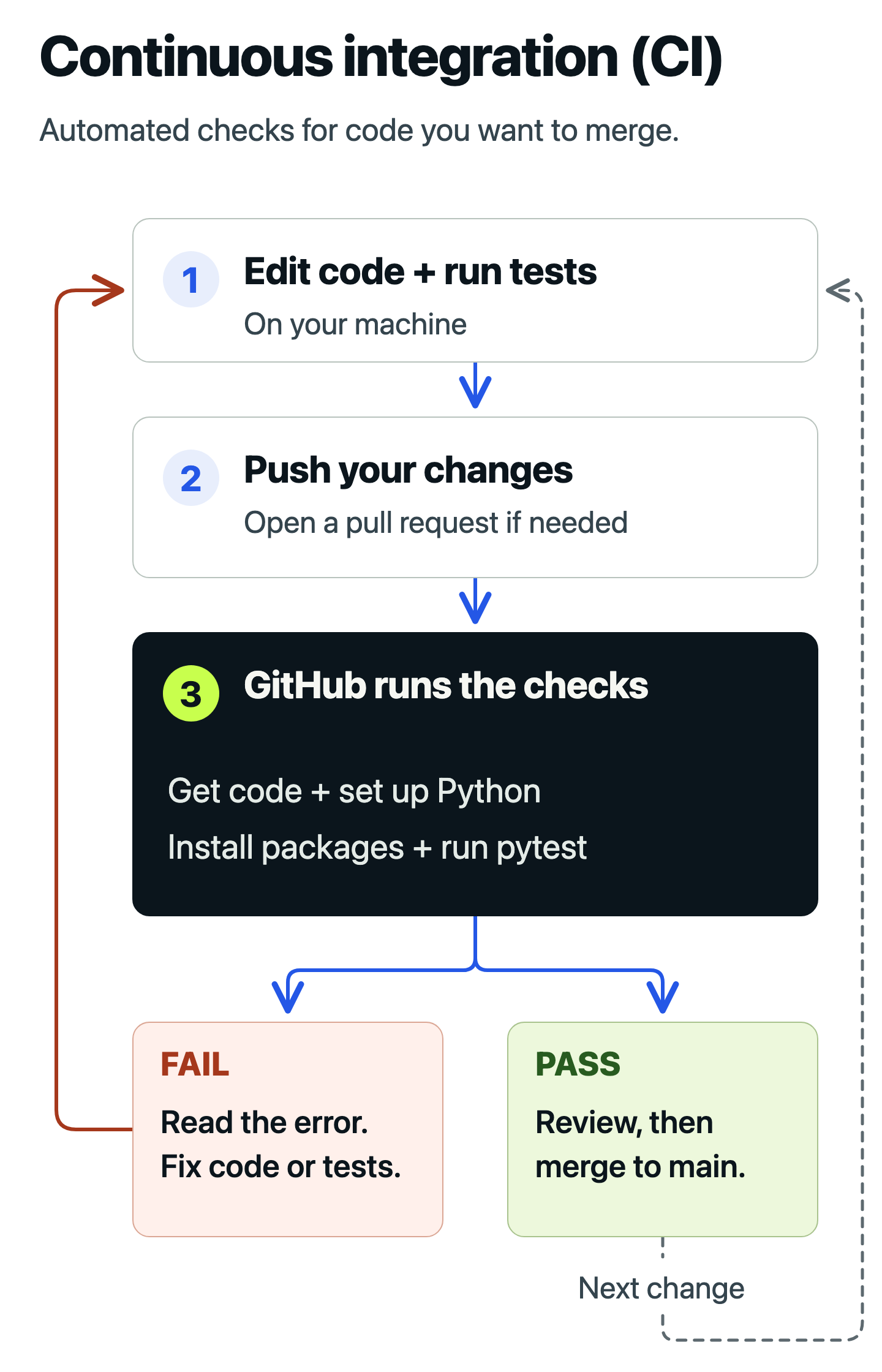
Each new commit to the pull request branch starts another check. A failed check sends you back to the error and its cause; a passing check lets you continue review and merging. This article’s workflow also runs after changes reach main.
We’ll start with 5 passing pytest tests and make GitHub run them for us. Then we’ll test more than 1 Python version, save reports to help investigate failures, and configure GitHub to block a merge when the tests fail. This workflow only checks the code; it does not deploy an application.
If pytest is new to you, first write and run your first Python test. You can follow the example below in a small repository, then apply the same steps to your own project.
02 / TEST PROJECT
Get 5 tests passing on your machine.
Run the tests locally before setting up GitHub Actions. That gives you a result to compare with GitHub’s first run and helps you spot setup problems.
What do you need before running pytest in GitHub Actions?
You’ll need Python 3.12 or newer, Git, and a GitHub repository where you can push a branch and open a pull request. This example uses pytest 9. If your project already has passing tests, use its existing setup and continue to the workflow section.
The steps below build a small project from scratch. The linked companion repository contains the finished version; follow its README if you prefer to run that copy. To use its workflow in your own repository, copy the example folder’s contents to the repository root, including the hidden .github folder.
Create the example files
Work from the root of your repository. By the end of the next section, it will contain these files; we’ll add tests.yml when we set up GitHub Actions:
python-ci-example/
├── .github/
│   └── workflows/
│       └── tests.yml
├── tests/
│   └── test_shop.py
├── pyproject.toml
├── requirements-dev.txt
└── shop.py
Our example calculates a shipping charge: orders below 50 cost 5 to ship, orders of 50 or more ship free, and negative totals are rejected.
Put the function in shop.py:
def shipping_cost(order_total: int) -> int:
    if order_total < 0:
        raise ValueError("order total must not be negative")
    return 0 if order_total >= 50 else 5
Create a tests folder and put this in tests/test_shop.py:
import pytest

from shop import shipping_cost


@pytest.mark.parametrize(
    ("order_total", "expected_cost"),
    [
        pytest.param(0, 5, id="zero"),
        pytest.param(49, 5, id="below-threshold"),
        pytest.param(50, 0, id="at-threshold"),
        pytest.param(75, 0, id="above-threshold"),
    ],
)
def test_shipping_cost(order_total: int, expected_cost: int) -> None:
    assert shipping_cost(order_total) == expected_cost


def test_shipping_cost_rejects_negative_total() -> None:
    with pytest.raises(ValueError, match="must not be negative"):
        shipping_cost(-1)
The parameter table runs the first test 4 times, once for each order total. The second test checks that a negative total raises the expected error. Together, that gives us 5 test cases.
Put the testing dependencies in requirements-dev.txt:
pytest>=9,<10
pytest-cov>=7,<8
pytest runs the tests. pytest-cov is an extension we’ll use later to measure which code the tests execute. These version ranges keep the example simple, but they allow newer releases within each range. For an existing project, use its dependency file or lockfile - a file recording exact dependency versions - in both local development and CI.
Add the pytest settings to pyproject.toml:
[tool.pytest]
addopts = ["-ra", "--strict-config", "--strict-markers"]
testpaths = ["tests"]
xfail_strict = true
testpaths tells pytest to look in tests. The addopts options add a short summary of failures and skips, and make invalid configuration or unknown test labels an error. xfail_strict makes an unexpectedly passing test fail the run if that test was marked as expected to fail. Our 5 tests don’t need that feature, but the setting keeps those exceptions visible as the suite grows.
The [tool.pytest] format requires pytest 9 or later. If your existing project uses an older version, keep its supported configuration format.
Run the tests locally
Create a virtual environment so the example’s packages stay separate from your other projects. On macOS or Linux, run:
python3 -m venv .venv
source .venv/bin/activate
On Windows with PowerShell, use:
py -m venv .venv
.venv\Scripts\Activate.ps1
With the environment active, install the dependencies and run the tests:
python -m pip install -r requirements-dev.txt
python -m pytest -q
python -m pytest uses pytest from the active Python environment. The -q option makes its output shorter. Look for this result; the timing will vary:
5 passed
Add .venv/, __pycache__/, and .pytest_cache/ to your .gitignore before committing. Commit the source, tests, and configuration files.
If your project already uses uv with a committed uv.lock, keep using that setup. The companion README shows its uv commands. The workflow below uses pip so you can follow it with Python’s standard tools.
For more practice writing tests and automating them with GitHub Actions, follow the Pytest course. Start with the free lessons.
View course03 / FIRST WORKFLOW
Tell GitHub when and how to run the tests.
A workflow is a file that tells GitHub what to do when an event occurs, such as opening a pull request. GitHub reads these files from .github/workflows/. They use YAML, a text format where indentation groups related settings.
A workflow contains jobs, and each job contains steps. In our example, 1 job gets a fresh Linux machine from GitHub, installs the test dependencies, and runs pytest. That machine is called a runner.
How do you run pytest in GitHub Actions?
Create .github/workflows/tests.yml at your repository root. Use the workflow below to run the same python -m pytest -q command that passed locally. This example runs when you open or reopen a pull request, push more commits to its branch, or push to main. Change main if your default branch has a different name.
name: Python tests

on:
  pull_request:
  push:
    branches: [main]

permissions:
  contents: read

jobs:
  pytest:
    runs-on: ubuntu-latest

    steps:
      - name: Check out repository
        uses: actions/checkout@v7
        with:
          persist-credentials: false

      - name: Set up Python
        uses: actions/setup-python@v7
        with:
          python-version: "3.14"
          cache: pip
          cache-dependency-path: requirements-dev.txt

      - name: Install test dependencies
        run: python -m pip install -r requirements-dev.txt

      - name: Run pytest
        run: python -m pytest -q
The steps run in order:
actions/checkoutcopies the repository onto the runner.actions/setup-pythonmakes Python 3.14 available.- The install command installs the packages from
requirements-dev.txt. - The last step runs the tests.
A step with uses: runs a reusable action, such as actions/checkout. A step with run: executes a shell command. The with: settings are inputs to an action; @v7 selects its major version. You can see how these fit together in GitHub’s Python workflow guide.
permissions: contents: read gives the workflow’s built-in access token permission to read repository contents. persist-credentials: false prevents checkout from leaving that token available to later Git commands. These tests need no credentials for deployment or other services.
Check the first run
Commit the workflow, push your branch, and open a pull request. Open the repository’s Actions tab, select the Python tests run, and open the pytest job. Expand Run pytest and look for 5 passed.
GitHub now runs the same test command you ran locally. If you later change which tests or options CI uses, update your local command too, so you can reproduce failures before pushing.
How does dependency caching speed up Python test workflows in GitHub Actions?
Dependency caching can speed up Python test workflows in GitHub Actions by letting pip reuse previously downloaded packages during dependency installation. When the required packages are in the restored cache, pip can avoid downloading them again.
With actions/setup-python, cache: pip enables pip caching. cache-dependency-path: requirements-dev.txt identifies the dependency file used to select the cache.
pip install still needs to run because the cache holds downloaded packages rather than an installed environment. Checkout must run first so the dependency file is available. If a needed package isn’t cached, pip downloads it normally.
Should you use GitHub’s Python workflow template for pytest?
GitHub’s Python workflow template is a starting point for running pytest, but its settings need to match your project. Choose Actions > New workflow > Python application, then check the Python version, branch names, install command, and test command before committing the file.
You don’t need a separate pytest action from the GitHub Marketplace for this example. A normal run: step already runs pytest and is easy to reproduce in your terminal.
04 / PYTHON VERSIONS
Run the same tests on each supported Python version.
A passing run on Python 3.14 tells you nothing about whether the code also works on Python 3.12. If your project promises to support both, test both.
How do you test multiple Python versions in GitHub Actions?
Use a matrix in GitHub Actions to run the same pytest job on each Python version your project supports. The matrix lists the versions, and GitHub creates 1 independent test job for each.
In tests.yml, replace the existing jobs: block with this one. Keep the name, on, and permissions settings above it:
jobs:
  pytest:
    name: pytest (Python ${{ matrix.python-version }})
    runs-on: ubuntu-latest
    strategy:
      fail-fast: false
      matrix:
        python-version: ["3.12", "3.13", "3.14"]

    steps:
      - name: Check out repository
        uses: actions/checkout@v7
        with:
          persist-credentials: false

      - name: Set up Python
        uses: actions/setup-python@v7
        with:
          python-version: ${{ matrix.python-version }}
          cache: pip
          cache-dependency-path: requirements-dev.txt

      - name: Install test dependencies
        run: python -m pip install -r requirements-dev.txt

      - name: Run pytest
        run: python -m pytest -q
${{ matrix.python-version }} inserts the version for the current job. The same value appears in its display name and in the Python setup step. You should see 3 jobs: 1 each for Python 3.12, 3.13, and 3.14.
fail-fast: false lets the other versions finish if one fails. That way, 1 run tells you which versions passed and which need attention.
Choose versions your project actually supports. An application deployed only on Python 3.14 may need just the original single-version job. A library used by other projects may need several versions. Add Windows or macOS jobs only if you also need to verify behavior on those systems.
Keep the version numbers quoted so YAML reads them as strings rather than numbers.
05 / COVERAGE AND REPORTS
See what the tests ran and keep the results.
We now know whether the tests pass on each Python version. 2 additions make the result easier to investigate: coverage tells us which code ran, and saved reports let us inspect test results after the job finishes.
Code coverage measures how much of the code the tests execute. Branch coverage also tracks alternative paths through decisions. For example, the negative-total check in shipping_cost can either raise an error or let the function continue. We want tests for both outcomes.
A test report answers a different question: which tests passed, failed, or were skipped? Pytest can save that information in JUnit XML, a structured file format that reporting tools understand. Despite the name, you don’t need Java or JUnit installed.
How do you save pytest coverage and test reports in GitHub Actions?
Generate a coverage report with pytest-cov and a test report with pytest’s --junitxml option, then save both using actions/upload-artifact. GitHub calls these saved files artifacts. They remain available to download after the runner is removed.
In the matrix job, replace Run pytest with these 2 steps. Keep them inside the existing steps: list:
      - name: Run pytest with coverage
        run: |
          mkdir -p test-results
          python -m pytest \
            --cov=shop \
            --cov-branch \
            --cov-report=term-missing \
            --cov-report=xml:coverage.xml \
            --cov-fail-under=100 \
            --junitxml=test-results/pytest.xml

      - name: Upload test reports
        if: ${{ always() }}
        uses: actions/upload-artifact@v7
        with:
          name: pytest-python-${{ matrix.python-version }}
          path: |
            coverage.xml
            test-results/pytest.xml
          if-no-files-found: warn
          retention-days: 7
The new pytest options do the following:
| Option | Purpose |
|---|---|
--cov=shop and --cov-branch |
Measure the code and decision paths in shop.py. Replace shop with your module or package when adapting the example. |
--cov-report=term-missing |
Show coverage and any untested lines or branches in the job log. |
--cov-report=xml:coverage.xml |
Write a coverage report for other tools to read. |
--cov-fail-under=100 |
Fail the run if total measured coverage is below 100%. |
--junitxml=test-results/pytest.xml |
Save the individual test results. |
The | after run: lets the command span multiple lines. The backslashes continue the pytest command onto the next line in the runner’s shell.
Run the new check locally too
The workflow now checks coverage as well as test results. Run the commands from its run: block locally to reproduce that check. In a Bash-compatible terminal, with your environment active:
mkdir -p test-results
python -m pytest \
  --cov=shop \
  --cov-branch \
  --cov-report=term-missing \
  --cov-report=xml:coverage.xml \
  --cov-fail-under=100 \
  --junitxml=test-results/pytest.xml
In PowerShell, run the python -m pytest command on 1 line, removing the backslashes. Pytest creates the report’s parent directory if needed.
Expect all 5 tests to pass and the coverage report for shop.py to show 100%. Keep generated files out of Git by adding .coverage, coverage.xml, and test-results/ to .gitignore.
This tiny function is small enough to test every measured path. For an existing codebase, choose a coverage requirement that reflects what the team can meaningfully test, then improve it as you add useful tests. Coverage tells you that code ran; it cannot tell you whether your assertions would catch a mistake.
Find the saved reports
After pushing the updated workflow, open its run in the Actions tab. On the run’s summary page, the Artifacts section should contain 1 download per Python version, such as pytest-python-3.14. Each contains coverage.xml and test-results/pytest.xml; this workflow keeps them for 7 days. Use the job log for the readable test output. Uploading XML files does not itself create a formatted test dashboard.
The version in each artifact name prevents the 3 jobs from trying to upload to the same name.
if: always() attempts the upload even when tests fail. If installation fails before pytest starts, there are no reports to save. if-no-files-found: warn reports that absence as a warning; inspect the earlier failed step to find the cause.
If you later want a browser-readable coverage report, the pytest-cov reporting documentation explains its HTML option.
06 / BLOCK FAILING MERGES
Stop a failing change from being merged.
Running tests on a pull request does not, by itself, prevent someone from merging it. You must also configure a repository rule that requires a successful result.
GitHub calls a result that must pass before merging a required status check. Our matrix produces several results, with names such as pytest (Python 3.14). We can give the repository rule 1 consistent name to require, even when the version list changes.
How do you require all pytest jobs to pass before merging on GitHub?
Add a GitHub Actions job named tests that waits for every pytest matrix job and passes only when they all succeed. Make its result a required status check in the repository’s branch protection rule or ruleset. You can then change the Python version list without changing the required check name.
Place this job inside jobs:, alongside pytest:, not inside its steps: list:
  tests:
    name: tests
    if: ${{ always() }}
    needs: pytest
    runs-on: ubuntu-latest
    steps:
      - name: Verify the complete matrix
        run: test "${{ needs.pytest.result }}" = "success"
needs: pytest makes the job wait for the test jobs. if: always() lets it run even if they fail; otherwise GitHub would normally skip a dependent job after a failure. The shell command test compares the combined result with success and fails if they differ. It does not run pytest a second time.
Check the complete file
With all the pieces in place, .github/workflows/tests.yml should look like this:
name: Python tests

on:
  pull_request:
  push:
    branches: [main]

permissions:
  contents: read

jobs:
  pytest:
    name: pytest (Python ${{ matrix.python-version }})
    runs-on: ubuntu-latest
    strategy:
      fail-fast: false
      matrix:
        python-version: ["3.12", "3.13", "3.14"]

    steps:
      - name: Check out repository
        uses: actions/checkout@v7
        with:
          persist-credentials: false

      - name: Set up Python
        uses: actions/setup-python@v7
        with:
          python-version: ${{ matrix.python-version }}
          cache: pip
          cache-dependency-path: requirements-dev.txt

      - name: Install test dependencies
        run: python -m pip install -r requirements-dev.txt

      - name: Run pytest with coverage
        run: |
          mkdir -p test-results
          python -m pytest \
            --cov=shop \
            --cov-branch \
            --cov-report=term-missing \
            --cov-report=xml:coverage.xml \
            --cov-fail-under=100 \
            --junitxml=test-results/pytest.xml

      - name: Upload test reports
        if: ${{ always() }}
        uses: actions/upload-artifact@v7
        with:
          name: pytest-python-${{ matrix.python-version }}
          path: |
            coverage.xml
            test-results/pytest.xml
          if-no-files-found: warn
          retention-days: 7

  tests:
    name: tests
    if: ${{ always() }}
    needs: pytest
    runs-on: ubuntu-latest
    steps:
      - name: Verify the complete matrix
        run: test "${{ needs.pytest.result }}" = "success"
Make GitHub require the result
Push the workflow and let it run so GitHub has a tests result to select. With repository admin access, open Settings > Branches to configure branch protection, or Settings > Rules > Rulesets if your repository uses rulesets.
Apply the rule to main, enable Require status checks to pass before merging, and select tests. Save the rule and check that it is active. The workflow file creates the result; this repository setting makes it a merge requirement. See GitHub’s protected-branch documentation for availability and other rule settings.
Prove that a failed test blocks the merge
Use a test branch and pull request for this exercise. In tests/test_shop.py, deliberately change:
pytest.param(50, 0, id="at-threshold"),
to:
pytest.param(50, 5, id="at-threshold"),
Run the tests locally. You should get 1 failed, 4 passed: an order of 50 ships free, so the new expectation is wrong.
Commit that temporary change and push it. Check that the Python jobs fail, the final tests check fails, and the pull request shows the required check blocking the merge. Accounts allowed to bypass repository rules may still have a bypass option.
Restore the expected value to 0, rerun locally, and push the correction. The tests and the required check should pass again. This confirms that GitHub reacts to a real test failure and recovers when it is fixed.
07 / TROUBLESHOOTING
Start with the first step that failed.
Open the failed job and read the first error. A problem installing packages needs a different fix from a failed assertion. If pytest ran, copy its command and try it locally with the same Python version.
The workflow does not start
Confirm that tests.yml is under .github/workflows/ at the repository root, not inside a project subfolder. Check that you opened or reopened a pull request, pushed more commits to its branch, or pushed to the branch named in the push trigger. If GitHub reports invalid YAML, check the indicated line and indentation before changing the tests.
The cache dependency file is missing
Run checkout before setup-python and make cache-dependency-path match the file’s location. If your project lives in backend/, that might be backend/requirements-dev.txt. The install and test steps also need to run from the correct directory.
A missing dependency file is different from a cache miss. A cache miss just means there are no saved downloads to reuse; installation should still work.
Pytest reports that no tests ran
Pytest treats finding no tests as an error. Check testpaths, file names such as test_shop.py, function names beginning with test_, and the directory from which the workflow runs. Don’t suppress this error: a successful check needs to have run the intended tests.
Imports work locally but fail in CI
The runner starts with committed files and the packages your workflow installs. It doesn’t inherit your laptop’s environment or uncommitted code.
First confirm that you committed the missing module and ran the tests from the right directory. If your project is an installable package, install it as its documentation requires, often with python -m pip install -e .. The small shop.py example does not need that step. Avoid changing sys.path in tests to hide an installation problem.
Coverage fails on only 1 Python version
Read that job’s coverage output to see which paths didn’t run. Code that behaves differently across Python versions may need different test cases. Investigate the missing behavior before lowering the coverage requirement.
Reports are missing after a failure
The upload step can save only files that were created. If dependency installation or test collection failed early, one or both reports may be absent. Check the first error in the job log before troubleshooting the upload.
A pull request from a fork cannot read a secret
This workflow needs no stored secrets. GitHub normally withholds repository secrets from pull requests opened from forks, which are copies of a repository owned elsewhere. Don’t switch to pull_request_target to run the contributor’s code with privileged credentials. Keep tests of contributed code separate from operations that need trusted access.
A rerun passes without a code change
A test that passes sometimes and fails other times is often called flaky. Look for dependence on timing, test order, shared state, or an external service. A passing retry is useful evidence for the investigation, but it doesn’t explain or fix the first failure.
Tests pass, but GitHub still blocks the merge
Check the exact required check name in the repository rule and compare it with the results on the pull request. If you renamed a job, the rule may still be waiting for its old name.
Repositories using a merge queue also need the workflow to run on the merge_group event. Otherwise the queue cannot receive its required test result. Follow GitHub’s guidance on required-check troubleshooting when adding that trigger.
08 / NEXT STEP
Use the workflow on your next pull request.
You now have a complete loop: run the tests locally, let GitHub repeat them on each supported Python version, inspect failures and reports, and require a passing result before merging.
For an existing project, start with its current test command and dependency setup. Add the other parts when they answer a real need:
- Use a lockfile when you need repeatable dependency versions.
- Add services such as a database when tests need them.
- Test additional operating systems when your project supports behavior that can differ between them.
- Keep deployment separate, with its own credentials and permissions.
The examples use readable action version tags such as @v7. For stricter control over dependency changes, pin actions to reviewed full commit identifiers, which identify an exact revision, and maintain those references as you would other dependencies.
If several developers will use this workflow, agree on the command everyone should run and how to handle failures. The article on making pytest part of a team’s daily engineering practice covers that next step.
Practice the full testing workflow, from your first pytest test to coverage and GitHub Actions, in the Pytest course.
View courseMore field notes
Keep reading.
Pytest Fixtures and Parametrization Best Practices
Reuse pytest setup without hiding what each test checks. Follow an inventory example through fixtures, parameter tables, failures, and fresh test data.
pytestPython testingFastAPI Testing with Pytest: A Practical API Testing Tutorial
Test a small FastAPI shipping API with pytest. See which checks catch a wrong response, a broken threshold, and invalid input, then learn when to introduce fixtures.
API testingFastAPIHow to Onboard a Python Team to Testing with Pytest
Learn how a 15-developer Python team used shared practice, legacy-code pinch points, and CI to turn pytest into an everyday engineering habit.
pytestPython testing