Pytest Hooks Tutorial with Practical Examples
Understand when pytest hooks help, build a plugin that selects tests and reports failures, then learn how to choose hooks for your own test suite.
Article summary
TL;DR
- Pytest hooks let a project extend configuration, test collection, execution, and reporting without putting that logic into each test.
- Use fixtures for test data, resources, and cleanup; use hooks for behavior that belongs to the test run.
- A root
conftest.pyacts as a local plugin. Implement a documented hook name, and pytest calls it at the appropriate moment. - The example combines five hooks to select checks by environment and print a visible summary with a command to rerun failures.
- Choose hooks by the problem and the information available at that stage, then verify their effect through an actual pytest run.
Code for this article
Open the repository to follow along.
artem-istranin/istranin-dev-code-examples01 / THE GOAL
Turn a failed test run into a clear next step.
Your checkout suite has checks that can run anywhere and others that belong in staging. You need a consistent way to select the right tests. When a check fails, you also need to rerun it with the same environment choice.
Let’s teach pytest that routine. We’ll build a small plugin that accepts --env=staging, skips checks meant for another environment, and adds this useful extra to a failed run:
====================== 🛒 CHECKOUT CHECK: STAGING =======================
❌ Tests needing attention: 1
🔁 Rerun just these tests:
uv run pytest --env=staging failure_example.py::test_inventory_count
The checkout summary is our custom output. The cart makes the project report easy to spot, the failure indicator shows that action is needed, and the command preserves the selected environment. The text labels keep it understandable without relying on icons. Pytest still shows its normal failure details above it.
We’ll use five pytest hooks in one local conftest.py plugin, from adding an option to printing the final report. Once the example works, we’ll connect those steps to the wider pytest lifecycle and see how to choose hooks for other problems. The tests themselves will stay ordinary test functions.
This tutorial assumes you can already write and run basic pytest tests. If you’re new to pytest, start with the beginner tutorial for your first pytest test.
Build your pytest foundation, from your first test to fixtures, mocking, and CI, in the complete pytest course.
View course02 / WHY HOOKS?
Use pytest hooks for the behavior around your tests.
A fixture could create a checkout client or prepare an inventory record. But our task also includes adding a command-line option, deciding which tests should run, and changing the final report. Those are useful moments to extend pytest itself.
What is a pytest hook?
A pytest hook is a function that pytest calls at a particular point during a test run. By implementing one in conftest.py, a project can add behavior at that point, such as checking the selected tests or printing an extra report.
You don’t call these functions from your tests. Pytest recognizes their hook names and calls them with the information they need. A collection hook gets the discovered tests; a reporting hook gets access to results or the terminal report.
A plugin is the place those extensions live. Pytest uses built-in plugins for much of its own behavior, and a project’s conftest.py can act as a local plugin.
When should a developer use pytest hooks instead of fixtures?
Use a fixture to provide something a test needs, such as a client, test data, or cleanup. Use a hook when the behavior belongs to the test run itself, such as adding an option, applying a rule to collected tests, or extending the report.
In our checkout example, the hook will apply the environment rule once for the suite. Each test only needs a marker saying where it belongs.
Start with existing pytest features
For simple selection, pytest already has marker filters. For rerunning failures saved in a local cache, it has --lf. Our example adds a shared convention: the environment choice controls test selection and appears in a command a teammate can copy from the run’s output, including a CI log.
03 / START THE EXAMPLE
Start with two small checkout checks.
Clone the companion repository, enter this example, and install its locked dependencies:
git clone https://github.com/artem-istranin/istranin-dev-code-examples.git
cd istranin-dev-code-examples/pytest-hooks-examples
uv sync --locked
The example uses Python 3.13 and pytest 9.1.1. If you need it, follow the uv installation guide first.
The companion checkout contains the finished plugin. The following steps explain how to build it; if you’re following along there, edit the existing conftest.py rather than adding duplicate functions.
Keep conftest.py beside the example’s test files. Pytest discovers that file automatically, so the tests don’t need to import the hooks or register the plugin themselves.
Our stand-in application is deliberately small. In checkout.py:
def checkout_message(environment: str) -> str:
    """Return the checkout status for an environment."""
    return f'checkout ready in {environment}'
And in test_checkout.py:
import pytest

from checkout import checkout_message


def test_checkout_message() -> None:
    assert checkout_message('local') == 'checkout ready in local'


@pytest.mark.env('staging')
def test_checkout_is_available_in_staging() -> None:
    assert checkout_message('staging') == 'checkout ready in staging'
The first test has no environment restriction. The second carries @pytest.mark.env('staging'), which is a label our plugin will read.
Both tests run entirely on your machine. The environment names demonstrate test selection; they don’t connect to a real staging service or change credentials.
04 / SELECT THE TESTS
Choose the environment once, then let pytest apply the rule.
First, pytest needs to understand --env and our env marker. pytest_addoption and pytest_configure handle that setup. Put these definitions in the example’s root conftest.py:
import pytest


ENVIRONMENTS = ('local', 'staging')


def pytest_addoption(parser):
    """Add the environment selector used by this test suite."""
    parser.addoption(
        '--env',
        action='store',
        default='local',
        choices=ENVIRONMENTS,
        help='run tests for the selected environment',
    )


def pytest_configure(config):
    """Register the environment marker in pytest's active configuration."""
    config.addinivalue_line(
        'markers',
        "env(name): run only in the named environment ('local' or 'staging')",
    )
pytest_addoption gives the run an environment choice, defaulting to local. pytest_configure tells pytest that env(name) is a marker this project supports.
Apply the environment rule with pytest_collection_modifyitems
Now add the rule itself to the same file:
def pytest_collection_modifyitems(config, items):
    """Skip tests whose environment marker does not match ``--env``."""
    selected_env = config.getoption('--env')

    for item in items:
        env_marker = item.get_closest_marker('env')
        if env_marker is None:
            continue

        if (
            len(env_marker.args) != 1
            or env_marker.kwargs
            or env_marker.args[0] not in ENVIRONMENTS
        ):
            raise pytest.UsageError(
                f'{item.nodeid}: env marker requires exactly one positional '
                "argument: 'local' or 'staging'"
            )

        required_env = env_marker.args[0]
        if required_env != selected_env:
            item.add_marker(pytest.mark.skip(reason=f'requires --env={required_env}'))
Pytest calls pytest_collection_modifyitems after finding the tests, before running them. items is that list of tests. We leave unmarked tests alone and mark a test to be skipped when its environment doesn’t match. A malformed marker stops the run with a message naming the affected test.
The first result: the same tests now behave differently based on one option. Run the two checkout checks:
uv run pytest test_checkout.py
You get 1 passed, 1 skipped. The staging check is skipped because the default environment is local. Select staging:
uv run pytest test_checkout.py --env=staging
Now you get 2 passed. The marker and selection rule work together; neither test contains an environment-checking if statement.
05 / MAKE FAILURES ACTIONABLE
Give a failed run a command to try next.
The environment selection works. Now let’s make a failure easier to act on: remember which tests failed, then build a command that reruns those tests with the same --env value.
Add import shlex at the top of conftest.py. Below ENVIRONMENTS, add a place to keep the failed test IDs for this run:
FAILED_TESTS = pytest.StashKey[set[str]]()
Then add pytest_runtest_makereport to inspect the test results:
@pytest.hookimpl(wrapper=True)
def pytest_runtest_makereport(item):
    """Remember tests with failures in setup, the test body, or cleanup."""
    report = yield

    if report.failed:
        item.config.stash.setdefault(FAILED_TESTS, set()).add(report.nodeid)

    return report
Pytest produces reports as each test runs. This hook reads those reports and remembers the IDs of tests with failures, including setup or cleanup failures. config.stash holds that information until the final summary. The set keeps each test ID once.
What does report = yield mean in a pytest hook?
In a hook marked @pytest.hookimpl(wrapper=True), report = yield pauses the function while pytest runs the wrapped hooks. When they return a report, pytest resumes this function and assigns that report to report.
Think of it as: “let pytest build the report, then let me inspect it.” The lines below yield record a failure, and return report passes the report back unchanged. The wrapper is useful here because we want to read pytest’s result without replacing how pytest creates it.
Print the next action with pytest_terminal_summary
Add the final hook to conftest.py:
def pytest_terminal_summary(terminalreporter, config):
    """Print a command to rerun failed tests in the selected environment."""
    failed_test_ids = sorted(config.stash.get(FAILED_TESTS, set()))
    if not failed_test_ids:
        return

    environment = config.getoption('--env')
    command = shlex.join(
        ['uv', 'run', 'pytest', f'--env={environment}', *failed_test_ids]
    )
    terminalreporter.section(f'🛒 CHECKOUT CHECK: {environment.upper()}')
    terminalreporter.write_line(f'❌ Tests needing attention: {len(failed_test_ids)}')
    terminalreporter.write_line('🔁 Rerun just these tests:')
    terminalreporter.write_line(command)
pytest_terminal_summary runs when pytest prints its end-of-run report. We use the saved IDs and environment to produce the command. shlex.join quotes test IDs when needed, so spaces or brackets in parametrized test names work in a POSIX shell such as Bash or Zsh.
When no tests fail, there’s no extra block to print. When one does, the normal failure report gains a concrete next step.
06 / TRY THE RESULT
Copy the command and rerun just the failed check.
The companion’s failure_example.py contains a staging check with an intentionally wrong inventory count: the function returns 2, while the test expects 3. Its filename keeps it out of normal test discovery, so we can request the failure when we want to see the report.
Run it alongside the passing checkout tests:
uv run pytest test_checkout.py failure_example.py --env=staging
After the assertion details, our plugin adds:
====================== 🛒 CHECKOUT CHECK: STAGING =======================
❌ Tests needing attention: 1
🔁 Rerun just these tests:
uv run pytest --env=staging failure_example.py::test_inventory_count
The overall result is 1 failed, 2 passed, and pytest exits with status 1. Copy the command from the custom block:
uv run pytest --env=staging failure_example.py::test_inventory_count
Now only the inventory check runs. It still fails until the underlying problem is fixed; the command saves you from finding its test ID and reconstructing the environment option.
To finish the exercise, change inventory_count() in failure_example.py to return 3 and rerun that command. You get 1 passed, and the custom failure block disappears. You’ve followed the full path from a failed run to a focused rerun and a passing check.
The companion also tests the plugin itself, including environment selection, fixture failures, and the generated rerun command. Run those checks with:
uv run pytest
uv run pytest --env=staging
This example targets ordinary runs in one pytest process. Parallel execution with pytest-xdist needs additional handling to combine results from workers.
07 / BEYOND THE EXAMPLE
Choose a pytest hook by the problem and the moment.
The checkout example is one use of a general pattern: wait until pytest has the information you need, then add a small piece of behavior. We read an environment option before execution, applied a rule after finding tests, and built a summary after results were available.
That gives you a practical way to understand the pytest lifecycle:
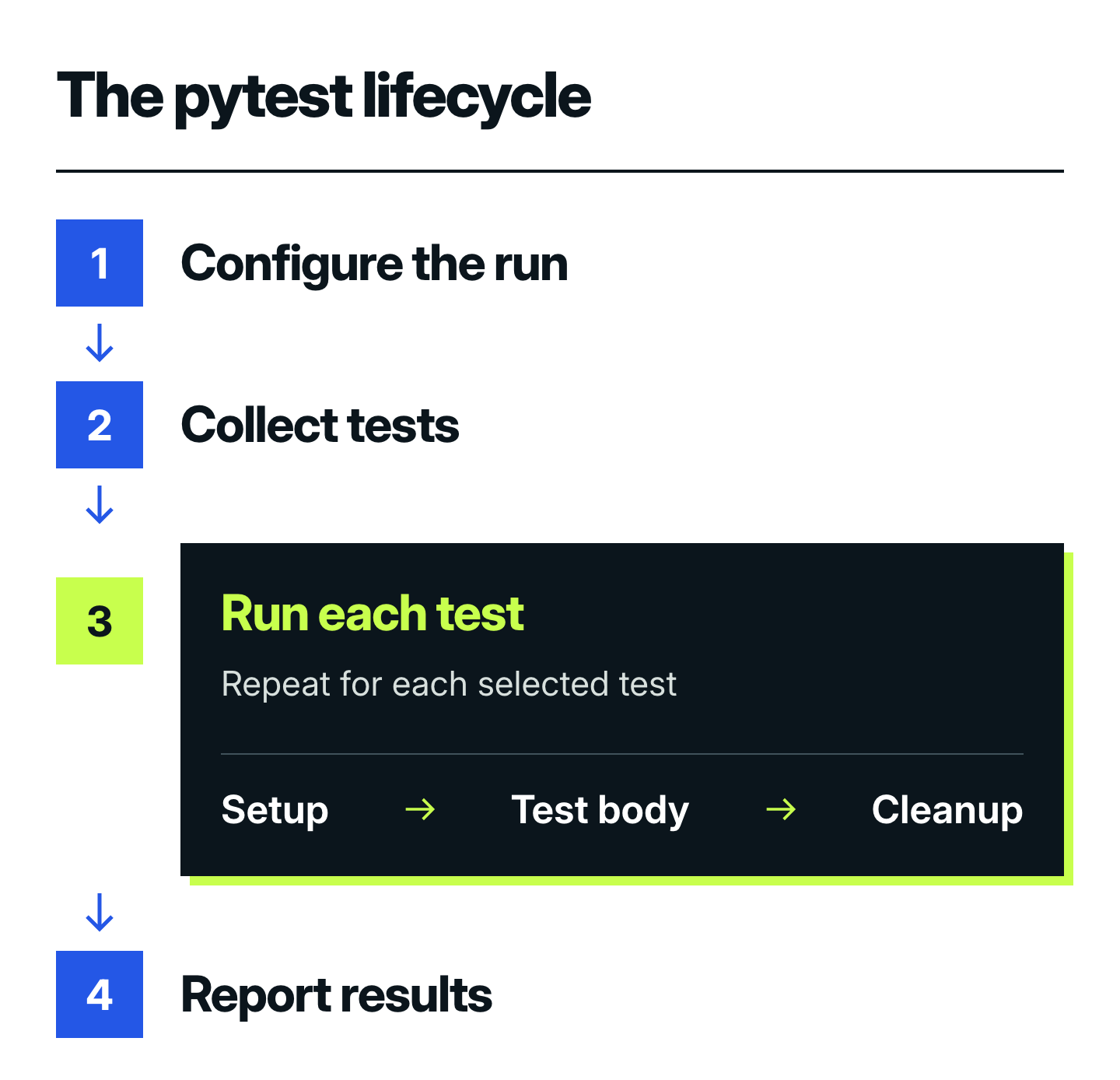
- Configure the run.
pytest_addoptionadded our--envoption, andpytest_configureregistered theenvmarker. These hooks prepare the runner before any tests execute. - Collect tests. Pytest discovers the tests. Our
pytest_collection_modifyitemshook then marks checks for another environment to be skipped, so every test follows the same selection rule. - Run each test. Fixtures prepare the resources a test needs during setup. The test body uses them and checks behavior; cleanup releases resources when the fixture’s scope ends. Shared fixtures can therefore outlive one test. Our
pytest_runtest_makereportwrapper observes each phase’s result and remembers failures, including setup and cleanup failures. - Report results. After execution,
pytest_terminal_summaryuses the failures we recorded to print the checkout summary and rerun command. The individual test reports already exist; this hook adds the final view.
Fixtures manage the resources used by tests. Hooks let us customize the surrounding workflow, from selecting tests to reporting what happened.
Which pytest hooks are useful for common test-suite tasks?
Start with the hook that runs when your task’s inputs are available. Options belong at startup, selection rules belong after collection, and result summaries belong after execution. These hooks cover common starting points:
| Task | Hook to explore | Connection to the example |
|---|---|---|
| Add a project-specific command-line flag | pytest_addoption |
We added --env. |
| Register project markers or initialize configuration | pytest_configure |
We registered env(name). |
| Apply rules to the discovered tests | pytest_collection_modifyitems |
We skipped checks for another environment. |
| Inspect the result of setup, a test body, or cleanup | pytest_runtest_makereport |
We remembered tests with failures. |
| Add a terminal report | pytest_terminal_summary |
We printed the checkout summary and rerun command. |
| Build test cases from configuration | pytest_generate_tests |
A next step when static parameter lists aren’t enough. |
| Perform an action when the whole session ends | pytest_sessionfinish |
A next step for session-wide bookkeeping or exporting results. |
Use this as a short map, then read the selected hook’s arguments and return behavior in the pytest hook reference. You don’t need to memorize the complete list.
Keep each hook responsible for one job
Our report hook remembers results; our summary hook presents them. That separation is useful beyond checkout. A result could feed a terminal summary, a file, or another reporting tool without moving assertions out of the tests.
Keep work done for every test small. If the final report needs a calculation over all results, collect the necessary information while tests run and do that calculation once at the end.
08 / COMMON QUESTIONS
Common questions before adapting pytest hooks.
The working example shows the main idea. These details help when applying it to a larger suite or reading other plugin examples.
Can pytest hooks receive fixtures as arguments?
Pytest does not inject fixtures into hook parameters. It supplies the arguments defined for that hook, such as config, items, or item. In pytest_collection_modifyitems(config, items), those names come from the hook’s API, not from fixture definitions.
Keep test resources and cleanup in fixtures. Use hooks for information or decisions about the run. Hook functions can omit documented arguments they don’t need, but can’t invent new ones. The hook argument guide explains that contract.
Do pytest hooks need the @pytest.hookimpl decorator?
Ordinary implementations of pytest’s existing hooks can use their documented pytest_ names without the decorator. Add @pytest.hookimpl when you need implementation options, such as wrapper=True to run around another hook implementation.
That’s why our collection function has no decorator but the report wrapper does. Older tutorials may show hookwrapper=True; its result handling differs from the wrapper=True form used here.
How does pytest order hook implementations?
Several plugins can implement the same hook. For a given hook call, wrappers run up to yield before regular implementations and resume afterward in reverse order. tryfirst=True and trylast=True request earlier or later execution within the relevant group of implementations.
These options affect implementations of the same hook; they don’t move collection after test execution or change the overall lifecycle. Use them when behavior really depends on order, following the hook ordering guide.
How can a developer test a pytest hook?
Test a hook through the pytest behavior it changes: which tests run, what gets skipped, which exit code is returned, and what the report contains. Pytest’s pytester fixture can create an isolated example project and run pytest against it.
The companion’s test_hooks.py uses that approach. It checks the environment rules, fixture failures, and whether the generated command actually reruns only the failed tests. That protects the result a developer relies on without tying the tests to individual lines of the implementation.
When should hooks move out of conftest.py?
A root conftest.py is a good starting point for behavior owned by one test suite. When several repositories need the same extension, consider a reusable plugin so its code, configuration, and tests can be maintained together.
The plugin-writing guide explains discovery and packaging. Check a hook’s documented scope when moving it between directories; putting it in a nested conftest.py doesn’t make every kind of hook affect only that directory.
09 / USE THE IDEA
Make the next hook solve one clear problem.
The checkout workflow now selects the appropriate tests, reports failures visibly, and gives the developer a command to rerun them in the same environment. We added that behavior around ordinary tests, using the information pytest makes available at each step.
The broader takeaway is a decision process you can reuse. Identify the repeated task around your tests. Check whether a fixture, marker, or existing pytest option already handles it. If the task belongs to the runner, choose the hook for that moment and test the outcome through a real run.
You can apply this to project-specific options, collection policies, extra failure context, or useful reports. Keep the first version local and small; the example shows how several focused hooks can cooperate when the workflow needs more than one step.
Continue with pytest’s hook reference for the event you need. The plugin guide and Pytest Plugin List can help you find an existing extension before building a larger one.
Try one adaptation: mark a test for an environment in your own suite and verify the run changes as intended. For shared test resources or varying input cases, continue with pytest fixtures and parametrization.
Build on this example with fixtures, mocking, and CI in the complete pytest course.
View courseMore field notes
Keep reading.
Pytest Fixtures and Parametrization Best Practices
Reuse pytest setup without hiding what each test checks. Follow an inventory example through fixtures, parameter tables, failures, and fresh test data.
pytestPython testingGitHub Actions Python Testing: A Complete pytest CI Guide
Run pytest automatically on GitHub pull requests. Start with 5 local tests, add reports and checks for supported Python versions, then block failing merges.
pytestGitHub ActionsHow to Onboard a Python Team to Testing with Pytest
Learn how a 15-developer Python team used shared practice, legacy-code pinch points, and CI to turn pytest into an everyday engineering habit.
pytestPython testing