How to Test a LangGraph Agent with pytest
Use pytest fixtures, parametrization, and exception assertions to test a LangGraph agent: direct answers, tool calls, and service failures.
Article summary
TL;DR
- Run the real compiled graph with controlled model messages and service results to test routing without API calls.
- Use fresh fixtures for dependencies and parametrized cases when the same behavior should work with different inputs.
- Check tool arguments, the result delivered to the next model turn, and the final answer or error visible to the caller.
- Add separate persistence or evaluation tests only when those responsibilities are part of the behavior you need to verify.
Code for this article
Open the repository to follow along.
artem-istranin/istranin-dev-code-examples01 / WHAT TO TEST
Test the graph with messages you choose
An order-status agent can answer a greeting immediately. For “Where is order A-42?”, it needs to call the order service, receive a status, and pass that result back to the model.
Those are 2 paths through the same LangGraph workflow. We can test both without asking a real model to choose a path. Pytest supplies the model messages and service results; the compiled graph still runs its nodes, routing, and message updates.
We’ll use 3 familiar pytest patterns: fixtures for fresh dependencies, parametrization for several order cases, and pytest.raises for a service failure. The tests need no LLM credentials or paid model calls.
This guide assumes you know what LangGraph state, nodes, and edges do, and can write a basic pytest test. If the framework is new to you, start with the LangGraph Graph API overview. We’ll explain the message types and routing details needed for the tests as we use them.
How do you test a LangGraph agent with pytest?
Invoke the real compiled graph with controlled model responses and mocked external services. Assert the tool arguments, the result passed to the next model call, and the final state or error visible to the caller. That tests how your workflow handles known inputs.
Keep the workflow running
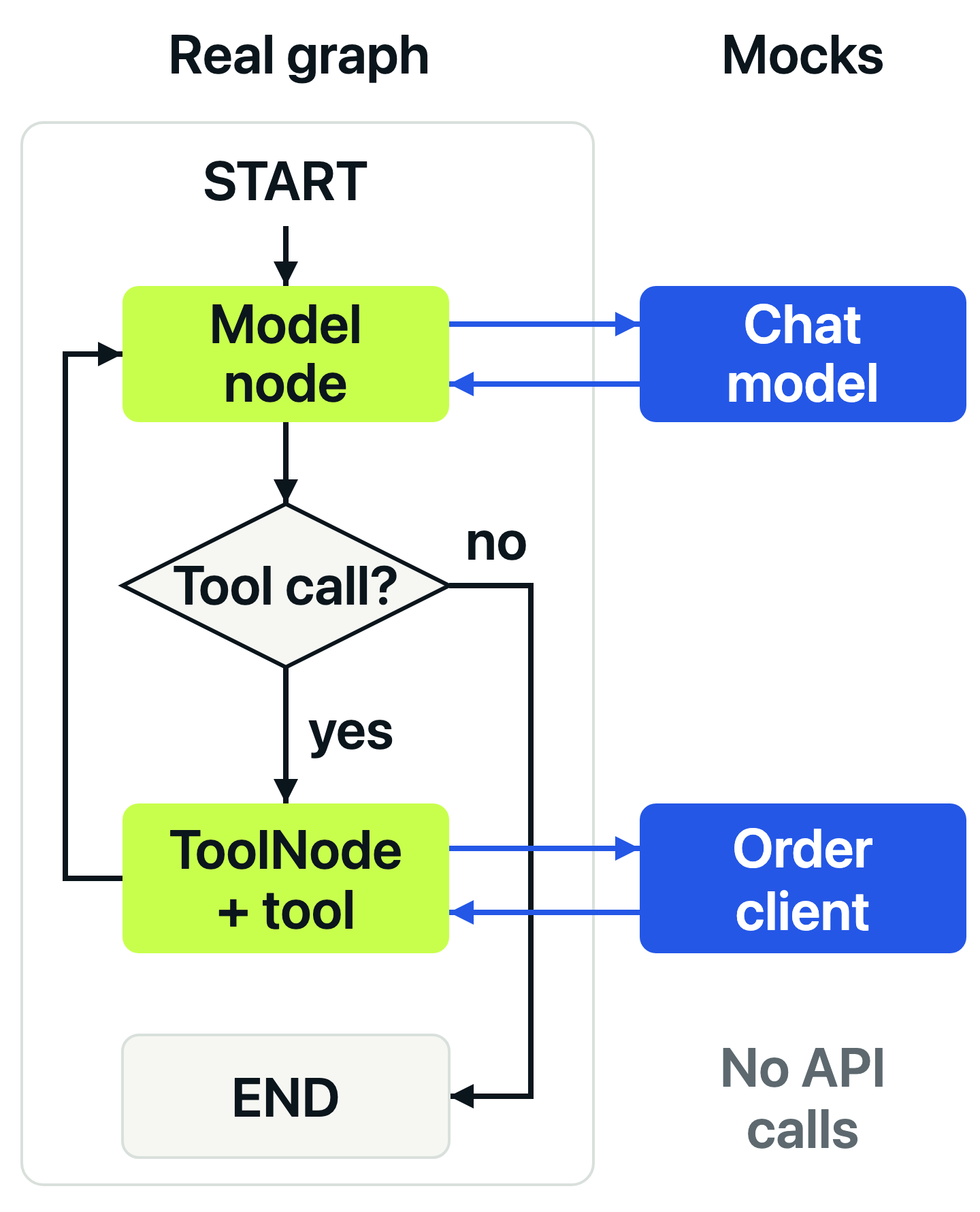
Our example has a model node and a tools node. A model response with a tool call takes the tools branch and returns to the model. A response without tool calls ends the run.
The test replaces the chat model and order-service client. It keeps the model node, tool wrapper, ToolNode, and routing real. That lets a broken connection or missing tool result fail the test.
02 / RUN THE EXAMPLE
Start with the finished files
The full example package contains agent.py, test_agent.py, and locked dependencies. You need Python 3.13 or later and uv.
git clone https://github.com/artem-istranin/istranin-dev-code-examples.git
cd istranin-dev-code-examples/langgraph-agent-testing
uv sync --locked
uv run pytest test_agent.py -v
uv sync --locked installs the recorded dependencies. uv run uses that environment, and -v shows each test case’s name. Expect 4 passed: one direct answer, 2 order lookups, and one timeout. Dependency installation needs network access; the tests use local replacements for the model and order service.
We’ll read and run the finished files, so don’t paste duplicate definitions into them. Keep the remaining commands in this directory.
The example was verified with Python 3.13.12, LangGraph 1.2.11, langchain-core 1.6.2, pytest 9.1.1, and pytest-mock 3.15.1. Use the lockfile while following along.
03 / THE GRAPH UNDER TEST
Pass the dependencies into the graph builder
In agent.py, OrderClient describes the service method the tool needs: get_status(order_id) returns a status string. build_agent() accepts this client and a chat model, so each test can supply controlled versions.
Practice choosing mock boundaries and writing useful assertions in the Pytest course. Start with the free lessons.
View courseHere is the application code:
from typing import Protocol

from langchain_core.language_models import BaseChatModel
from langchain_core.messages import SystemMessage
from langchain_core.tools import tool
from langgraph.graph import START, MessagesState, StateGraph
from langgraph.prebuilt import ToolNode, tools_condition


class OrderClient(Protocol):
    def get_status(self, order_id: str) -> str: ...


def build_agent(model: BaseChatModel, order_client: OrderClient):
    @tool
    def get_order_status(order_id: str) -> str:
        """Return the current status of an order."""
        return order_client.get_status(order_id)

    tools = [get_order_status]
    model_with_tools = model.bind_tools(tools)

    def call_model(state: MessagesState):
        response = model_with_tools.invoke(
            [
                SystemMessage(content="Help customers track their orders."),
                *state["messages"],
            ]
        )
        return {"messages": [response]}

    builder = StateGraph(MessagesState)
    builder.add_node("model", call_model)
    builder.add_node("tools", ToolNode(tools, handle_tool_errors=False))
    builder.add_edge(START, "model")
    builder.add_conditional_edges("model", tools_condition)
    builder.add_edge("tools", "model")
    return builder.compile()
The important route is the last 5 lines. tools_condition looks at the most recent model response: tool calls go to the node named tools; otherwise the graph finishes. After a tool runs, the explicit edge sends execution back to model.
MessagesState combines message updates with the existing conversation. The model node returns its new message, and ToolNode adds a ToolMessage containing the service result. That message also carries the tool-call ID, linking a result to the request that produced it.
model.bind_tools(tools) returns the model configured with the available tool definitions. The node calls that returned object’s invoke() method. Our fixture will control both steps.
We set handle_tool_errors=False because this example should stop and propagate a service error. We’ll test that policy explicitly. There is no checkpointer, retry policy, or persistence setup to configure here.
04 / FRESH TEST DEPENDENCIES
Use fixtures for setup and keep each scenario visible
All test code lives in test_agent.py. It imports pytest, the message classes, and the graph builder:
import pytest
from langchain_core.language_models import BaseChatModel
from langchain_core.messages import AIMessage, HumanMessage, ToolMessage

from agent import OrderClient, build_agent
The order-service fixture creates a new mock for each case:
@pytest.fixture
def order_client(mocker):
    return mocker.create_autospec(OrderClient, instance=True, spec_set=True)
create_autospec checks the method names and call signatures against OrderClient. instance=True models a client object, and spec_set=True prevents assigning unknown attributes. Each test still chooses a realistic return value or exception; autospeccing doesn’t validate those values.
The model fixture returns a factory, letting each test choose its sequence of responses:
@pytest.fixture
def model_script(mocker):
    def make(*responses):
        model = mocker.Mock(spec=BaseChatModel)
        bound_model = mocker.Mock(spec=["invoke"])
        bound_model.invoke.side_effect = responses
        model.bind_tools.return_value = bound_model
        return model, bound_model

    return make
There are 2 mock objects because the application makes 2 kinds of calls:
| Object | Application call | Test controls |
|---|---|---|
model |
bind_tools(tools) |
Which configured model is returned |
bound_model |
invoke(messages) |
The response for each model turn |
side_effect consumes responses in order. One response is enough for a greeting; a tool lookup needs a tool-call message followed by an answer. An unexpected extra model call exhausts the sequence and fails the test.
spec=BaseChatModel constrains the model mock’s available attributes. The bound mock exposes invoke, the operation this graph uses. These lightweight specs don’t check argument signatures or whether a real model would produce the configured messages.
The factory returns both objects so the test can pass model to the builder and inspect bound_model.invoke directly. This avoids repeatedly navigating through model.bind_tools.return_value in assertions.
Pytest’s default fixture scope gives every case fresh mock call history and response sequences. We also build a new graph in each test. For more on reusing setup without sharing mutable test state, see the pytest fixtures and parametrization guide.
05 / AN ANSWER WITHOUT A TOOL
Check the simplest routing branch first
A greeting needs one model response and no order lookup. The first test supplies that response as a real AIMessage:
def test_direct_answer_skips_order_lookup(model_script, order_client):
    model, bound_model = model_script(AIMessage(content="Hello!"))
    agent = build_agent(model, order_client)

    result = agent.invoke({"messages": [HumanMessage(content="Hello")]})

    assert result["messages"][-1].content == "Hello!"
    bound_model.invoke.assert_called_once()
    order_client.get_status.assert_not_called()
HumanMessage supplies the user’s input. The scripted AIMessage has text but no tool calls, so the real conditional edge should end the graph after the model node runs.
The assertions check the answer exposed in the final state, exactly one model call, and no order-service call. Checking that unused dependency matters: returning the expected answer would not justify making an unnecessary service request.
Run this case on its own:
uv run pytest test_agent.py::test_direct_answer_skips_order_lookup -v
Expect 1 passed. We now have coverage for the graph’s immediate completion path. Next, we’ll exercise the loop through the tool.
06 / THE TOOL ROUND TRIP
Parametrize the order cases and follow the result
For an order lookup, the first model response must request the tool. The helper in test_agent.py constructs that message:
def order_status_tool_call(order_id):
    return AIMessage(
        content="",
        tool_calls=[
            {
                "name": "get_order_status",
                "args": {"order_id": order_id},
                "id": "call-1",
                "type": "tool_call",
            }
        ],
    )
The tool name matches the function in agent.py, args contains its input, and id identifies this call. ToolNode will attach that ID to the result message. We use real LangChain message objects so the actual routing and tool execution process the same message structure used by the application.
The successful interaction is the same for a shipped order and one still processing. Parametrization lets both cases share a test while reporting separate results:
@pytest.mark.parametrize(
    ("order_id", "status", "answer"),
    [
        pytest.param("A-42", "shipped", "Order A-42 has shipped.", id="shipped"),
        pytest.param(
            "B-17", "processing", "Order B-17 is processing.", id="processing"
        ),
    ],
)
def test_tool_result_reaches_next_turn(
    model_script, order_client, order_id, status, answer
):
    order_client.get_status.return_value = status
    model, bound_model = model_script(
        order_status_tool_call(order_id),
        AIMessage(content=answer),
    )
    agent = build_agent(model, order_client)

    result = agent.invoke(
        {"messages": [HumanMessage(content=f"Where is order {order_id}?")]}
    )

    order_client.get_status.assert_called_once_with(order_id)
    tool_messages = [m for m in result["messages"] if isinstance(m, ToolMessage)]
    assert len(tool_messages) == 1
    tool_result = tool_messages[0]
    assert (tool_result.tool_call_id, tool_result.content) == ("call-1", status)
    assert bound_model.invoke.call_count == 2
    second_input = bound_model.invoke.call_args_list[1].args[0]
    assert tool_result in second_input
    assert result["messages"][-1].content == answer
Each pytest.param row supplies an order ID, a service status, and a scripted final answer. The id labels make failures easy to identify as shipped or processing. Fixtures are created separately for each row.
The assertions follow the information through the graph:
- The order client receives the requested order ID exactly once.
- The final state contains one tool result with the correct call ID and status.
- The model runs again, and its second input includes that tool result.
- The caller receives the scripted answer.
call_args_list[1] selects the second recorded model call. Its .args[0] is the message list passed as the first positional argument. We check for the actual result message there instead of freezing the system prompt or comparing the entire conversation.
The final answer is a value supplied by the test. Comparing it exactly verifies that the graph returns it; it doesn’t evaluate how a real model writes an answer. The status rows also don’t test whether a model understands the words “shipped” and “processing”. They test whether the graph carries each supplied result correctly.
Run just the processing case:
uv run pytest 'test_agent.py::test_tool_result_reaches_next_turn[processing]' -v
Expect 1 passed. The quotes keep the brackets literal in shells such as zsh.
See which regression the test catches
Temporarily remove builder.add_edge("tools", "model") from agent.py. Keep all mocks and assertions unchanged, then run:
uv run pytest test_agent.py -k tool_result_reaches_next_turn -v
Both order cases fail at the assertion expecting 2 model calls: the graph stopped after the tool, so the model ran only once. The test caught a missing return edge while using exactly the same scripted responses.
Restore that line and run uv run pytest test_agent.py -v. All 4 cases pass again. This is why the graph stays real: the test needs to execute the connection it protects.
07 / A SERVICE FAILURE
Make the tool fail and check where execution stops
The order service might time out. We can trigger that failure immediately by assigning an exception to side_effect:
def test_order_timeout_stops_the_graph(model_script, order_client):
    order_client.get_status.side_effect = TimeoutError("order service unavailable")
    model, bound_model = model_script(order_status_tool_call("A-42"))
    agent = build_agent(model, order_client)

    with pytest.raises(TimeoutError, match="order service unavailable"):
        agent.invoke({"messages": [HumanMessage(content="Where is order A-42?")]})

    order_client.get_status.assert_called_once_with("A-42")
    bound_model.invoke.assert_called_once()
pytest.raises checks that the timeout reaches the caller. match checks the exception message. The remaining assertions confirm that the order service was called once and the model never started a second turn.
That matches the ToolNode(..., handle_tool_errors=False) setting in the graph. The tool wrapper stays real and calls the mocked client; when the client raises, the error propagates through the graph. The ToolNode reference describes its error-handling options.
A different application might return a safe error message or retry a specific failure. Choose the intended behavior first, then assert that outcome and any retry limit. Don’t add a fallback merely to make a failing test pass.
This is the same pytest technique used for ordinary services. The mocking tutorial’s exception example explains side_effect independently of LangGraph.
08 / WHERE TO GO NEXT
Add tests when another responsibility needs protection
We tested the direct-answer branch, the tool round trip with 2 inputs, and the chosen timeout policy. The graph ran throughout; only the model and order service were replaced. That gives us repeatable checks of routing and message flow without provider calls.
Should you test each LangGraph node separately?
Test a node separately when it owns meaningful validation, branching, or state transformation. Keep a compiled-graph test for behavior that depends on routing or passing state between nodes. One test per node is not a useful target by itself.
LangGraph’s testing guide shows direct node invocation and partial graph execution. Direct node calls bypass checkpointers, so they don’t verify persistence behavior.
Do LangGraph tests need a checkpointer?
Only when the behavior under test uses saved state, such as continuing a conversation or resuming an interrupted run. This example completes one invocation without persisted state, so it compiles the graph without a checkpointer.
When you add persistence tests, use a fresh test checkpointer and isolate thread IDs between independent conversations. Test the promised continuation or isolation behavior rather than introducing persistence into every routing test.
What does a mocked graph test leave untested?
It doesn’t establish whether a real model will choose the right tool, whether a provider accepts your request, or whether an answer is accurate. Those questions need separate provider integration checks or model evaluations.
For the broader model-and-tool testing pattern, read Unit Testing AI Agents with Pytest. It covers application contracts and provider adapters without requiring LangGraph.
Apply the same patterns to your graph
Start with one representative tool call and a path that skips the tool. Add another parameter row when the behavior stays the same but the data changes. Add a separate test when the promised behavior changes, such as a timeout, retry, or authorization failure.
Keep async execution, streaming, checkpoint recovery, and multi-agent coordination for tests that actually exercise those features. The 4 cases here cover a synchronous, single-tool graph; they provide a starting point for that scope.
Continue with the Pytest course for practice with fixtures, parametrization, mocking, and clear failure reports.
View courseMore field notes
Keep reading.
Unit Testing AI Agents with Pytest
Test a small tool-using AI agent without calling an LLM. Use pytest fixtures and mocks to check tool calls, answers, failures, and provider adapters.
pytestAI agentsPytest Fixtures and Parametrization Best Practices
Reuse pytest setup without hiding what each test checks. Follow an inventory example through fixtures, parameter tables, failures, and fresh test data.
pytestPython testingPytest Mocking Tutorial: Patch Dependencies Without Hiding Bugs
Test a wallet with a controlled exchange rate, simulate lookup failures, and see how stricter mocks catch calls that real code would reject.
pytestMocking