Write Python Tests with AI: Build a Pytest Skill
See how AI-generated tests can repeat a bug or expose it. Connect clear requirements to a pytest testing harness, then collect the workflow into a reusable skill.
Article summary
TL;DR
- Separate the task contract, durable repository rules, reusable testing skill, and commands that check the code.
- A test that copies an implementation mistake can pass with 100% coverage. Expected results need an independent source.
- For a reproducible bug, observe a meaningful failure before fixing production code, then keep the justified expectation unchanged.
- Use a fast focused test while editing and the full pytest suite with coverage before finishing.
- Package the verified workflow in
SKILL.mdfor Claude Code or Codex, and inspect actual results instead of trusting a completion message.
01 / THE USEFUL OUTCOME
Give the agent a way to find out that it is wrong.
Ask an AI coding agent to add tests, and it can produce a tidy suite that passes while protecting the wrong behavior. A private constant changes, so the agent asserts its new value. A condition contains a mistake, so the test copies the same condition into its expected result.
The code and test agree. That agreement does not tell us whether the software does what we need.
To write Python tests with AI, we need to give the agent more than a filename and a coverage target. We need a clear contract, instructions for choosing useful tests, and commands that return evidence about its work. Then we can package that workflow into a reusable pytest skill for Claude Code or Codex.
Let’s follow those pieces through one small problem. A notification service should stop retrying after its third attempt. Its retry policy has an off-by-one bug, and we want the agent to catch it without turning the current implementation into the specification.
By the end, you will understand how a pytest testing harness gives the agent useful feedback. You will also have a complete SKILL.md to adapt for Claude Code or Codex. The retry example is a guided explanation you can follow by reading; the reusable skill is the piece to take into your own project.
Here, a testing harness means the environment, tests, commands, and results that let the agent check its changes. We are testing ordinary Python code written or edited by an agent; evaluating an AI application’s answers is a separate problem.
The examples assume basic Python and pytest knowledge. If reading a failure report is still unfamiliar, start with your first pytest test.
02 / BUILD THE INSTRUCTIONS
Separate what should happen from how the agent should work.
A useful instruction answers a decision the agent will face. “Write good tests” leaves almost every decision open. “Derive the expected result from the retry limit, then prove the test fails before fixing the code” tells it where to get the answer and how to check its work.
There are 4 parts to assemble:
| Part | What it supplies | In our example |
|---|---|---|
| Task contract | The behavior needed for this change | Stop after 3 completed attempts |
| Repository guidance | Stable project rules and commands | Test public behavior; run pytest with coverage |
| Testing skill | A reusable procedure | Inspect, test, observe failure, fix, review |
| Executable harness | Feedback from the actual code | Pytest failures and coverage results |
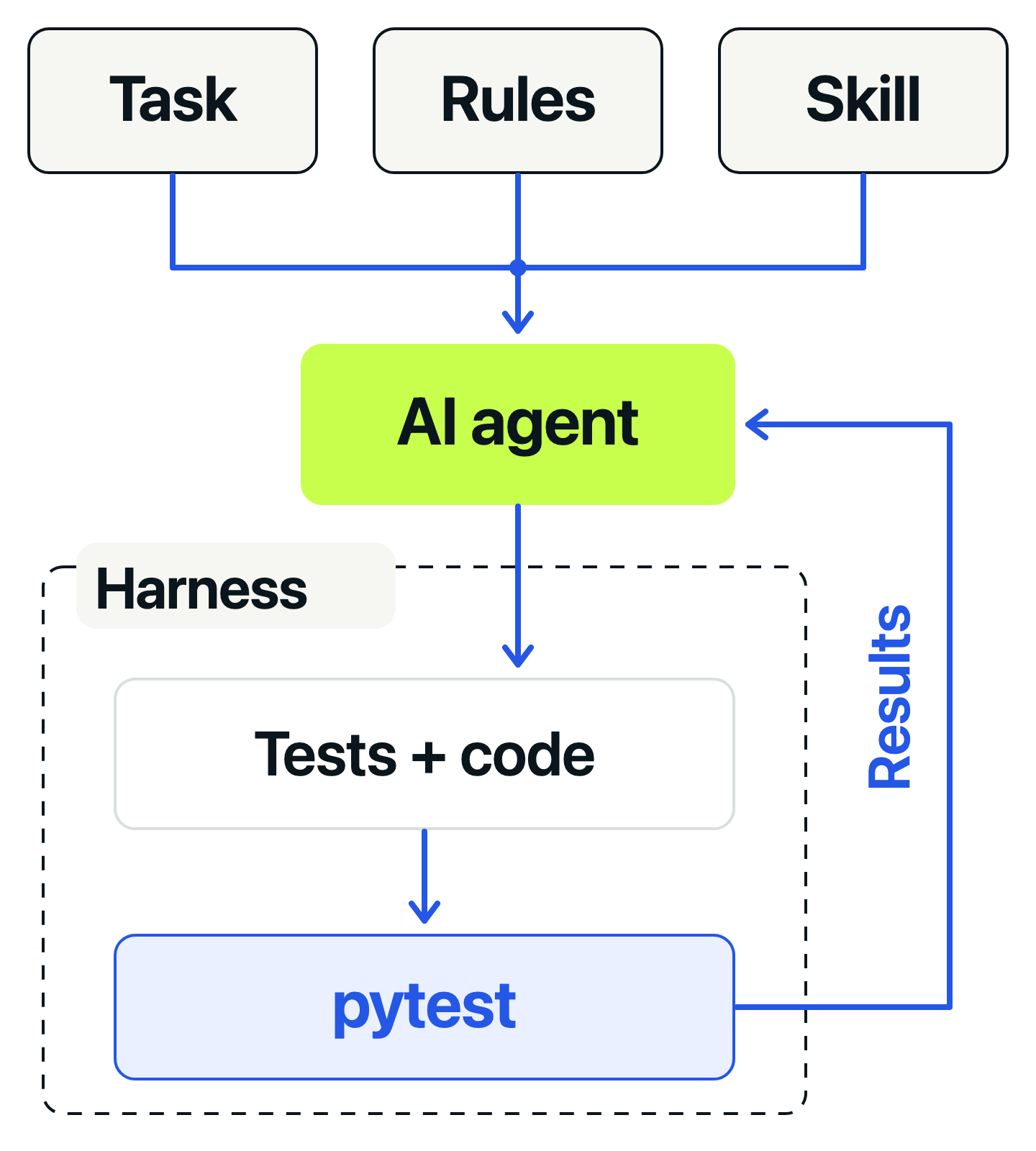
The task changes from one bug to the next. Repository rules should remain useful across many tasks. The skill describes the testing process; the harness executes the checks. Putting all 4 into one enormous prompt makes them harder to maintain independently.
Give the task an explicit contract
For this example, the notification service has already decided that the operation is safe to retry. Our function only decides whether the status and attempt count allow another attempt. It does not send requests or schedule delays.
Use this task description:
Fix the notification retry policy.

Statuses 502, 503, and 504 may be retried while attempts remain.
Other statuses must not be retried.
attempts_used counts completed attempts, including the latest one.
With max_attempts=3, allow another attempt after attempt 2,
but stop after attempt 3. A caller may supply a different limit.
Inputs are already validated positive integers by the caller.

Inspect the implementation and tests. State the contract and propose
the smallest useful test plan before editing. Ask if a required
expectation cannot be established from the supplied requirements.
That definition resolves an easy ambiguity: does “3 attempts” mean 3 total attempts or 3 retries after the first? The agent should not settle that question by reading whichever comparison happens to exist.
Keep project rules short and durable
Use AGENTS.md for Codex project guidance and CLAUDE.md for Claude Code. Their loading rules differ; use the file your tool supports.
Give the agent 2 pytest commands: one for focused feedback while editing and one for the full suite with coverage. We will configure coverage in the next section.
The repository instructions can state that distinction directly:
## Testing

Protect stable behavior through public or stable practical boundaries.
Inspect callers and nearby tests before choosing cases or fixtures.
Trace expected results to requirements, not just the implementation.
Do not assert private literals, helper calls, or incidental markup.

From the repository root:
- Focused feedback: uv run pytest --no-cov <test-path>
- Full suite with coverage: uv run pytest

Do not weaken assertions, skip tests, or lower coverage to make a
change pass. Report commands, results, and anything not verified.
Practice choosing useful assertions and test boundaries in the Pytest course before handing those decisions to an agent.
View course03 / BUILD THE HARNESS
Make the feedback easy to run and difficult to misread.
The harness connects the agent’s edits to observable results. Pytest runs the assertions, and coverage shows which parts of the application were exercised. A focused test gives quick feedback while editing. The full suite checks for effects elsewhere before the agent finishes.
For our example, imagine a project with the retry function in retry_policy.py and its tests under tests/. It uses uv to manage Python dependencies, including pytest and pytest-cov. The relevant configuration in pyproject.toml looks like this:
[tool.pytest.ini_options]
testpaths = ["tests"]
pythonpath = ["."]
addopts = "--cov=retry_policy --cov-report=term-missing"

[tool.coverage.run]
branch = true

[tool.coverage.report]
fail_under = 100
show_missing = true
testpaths tells pytest where the tests live. pythonpath makes the root-level module importable. The coverage options measure retry_policy, include branches, and require 100% coverage. In a real project, the coverage target would be your application package.
The pytest-cov configuration guide documents the default pytest options; Coverage.py’s configuration defines branch measurement and the failing threshold.
One command returns the evidence
With those settings, the full test command is simply:
uv run pytest
Pytest reads the configuration and reports failed assertions and missing coverage. A failing test or coverage below 100% makes the command fail. For focused feedback, --no-cov lets the agent inspect one test without unrelated coverage gaps obscuring its result.
CI can run the same uv run pytest command after checkout and dependency installation. The GitHub Actions pytest guide explains that setup and how to require a passing result before merging.
This gives the agent a dependable way to check its work. But the harness cannot decide whether an expected answer is correct. The next comparison shows why the instructions still matter.
04 / COMPARE USEFUL AND MISLEADING TESTS
Compare a test that repeats the bug with one that exposes it.
Imagine the agent is reviewing our notification service after its third attempt. The status is 503, so a retry is normally allowed. But the service has already used all 3 attempts. The expected decision is stop.
Here is the bug in the retry policy:
def should_retry(status_code, attempts_used, max_attempts=3):
    if status_code not in {502, 503, 504}:
        return False
    return attempts_used <= max_attempts
At the limit, that last comparison becomes 3 <= 3. It returns True, allowing a fourth attempt. Let’s compare 2 ways an AI agent might test this code. The snippets show the reasoning; there is no need to create files or run them to follow the example.
The misleading test copies the implementation
An agent can read the condition and use it to calculate the expected result:
@pytest.mark.parametrize("status, used", [(503, 2), (503, 3), (400, 1)])
def test_copied_condition(status, used):
    expected = status in {502, 503, 504} and used <= 3
    assert should_retry(status, used) is expected
For the third attempt, the function returns True and the test expects True. Pytest reports a pass. Both answers came from the same mistaken comparison, so the test has no independent reason to reject the behavior.
These cases even reach 100% statement and branch coverage: they execute both the allowed-status path and the rejected-status path. The agent could report 3 passing tests and full coverage while leaving the retry bug untouched. Execution was measured; the intended limit was never checked.
The useful test starts with the requirement
The contract gives the agent a different source for its answer: after 3 completed attempts, there must be no fourth attempt.
def test_stops_at_attempt_limit():
    assert should_retry(503, attempts_used=3, max_attempts=3) is False
Against the same broken function, this test fails with assert True is False. That failure is useful feedback. It identifies a disagreement between the implementation and the requirement.
The fix changes the code, not the justified expectation
The corrected comparison is:
return attempts_used < max_attempts
Now 3 < 3 is False. The useful test passes with its assertion unchanged. The old copied-condition test fails at this boundary because it still expects the wrong behavior. That expectation needs correcting against the requirement.
This is the red-green cycle used in test-driven development. A test first detects the relevant defect, then passes when the implementation meets the requirement. An import error would not provide the same evidence: it would tell us that the test could not reach the behavior at all.
The boundary test is a starting point. A useful suite also checks the allowed statuses, a status that must not retry, attempts beyond the limit, and a caller-supplied limit. Each case needs an expected answer grounded in the contract.
When guiding the agent, ask it to explain where that answer came from and what mistake would make the test fail. A green result is much more informative once we know what the assertion can detect.
05 / JUDGE THE EVIDENCE
Review what a test protects before counting it.
The copied-condition tests reached 100% coverage while missing the bug. Coverage measured execution. It could not decide whether the expected result matched the requirement.
I use a strict 100% statement and branch coverage gate for project-owned code. It makes unexplored paths visible and keeps coverage gaps from being silently accepted. An established project may need a different starting policy. Either way, treat a gap as a question about behavior, not permission to add an assertion for every line.
When reviewing AI-generated pytest tests, ask 3 questions: where did the expected answer come from, what realistic defect would fail this test, and would a safe refactor leave it useful?
Our retry tests can survive moving the status set into a constant or extracting a helper. A test of the private set itself would make those changes harder without checking the returned decision. Assertions about exact markup, copy, or collaborator calls need the same justification: that exact output or interaction must be part of the contract.
There is no need to mock should_retry(). Replacing it would remove the behavior we are testing. When dependencies do need replacing, keep the unit’s real work visible and mock the boundary, as in the pytest mocking tutorial.
Nor does our function test prove that the notification worker counts attempts correctly or stops sending requests. Those are separate responsibilities. Test them where that behavior is observable. The guide to unit, integration, and end-to-end tests explains how to choose those boundaries.
A passing test is useful evidence when its expectation is justified and a relevant mistake would make it fail.
Must every AI-generated test fail before it can be useful?
No. A regression test for a reproducible bug should fail against the broken behavior. A characterization test records verified existing behavior before a refactor and may pass immediately. Check why that behavior deserves protection; where practical, a temporary local mutation can show that the assertion detects a relevant change.
For more examples of choosing cases, fixtures, and stable assertions, see Python unit testing best practices.
06 / PACKAGE THE SKILL
Turn the verified workflow into a reusable pytest skill.
The skill turns the article’s reasoning into explicit instructions for the agent. It specifies where expected answers come from, which commands to run, and what evidence is needed before reporting completion.
A skill is a directory containing SKILL.md. Its name and description help the agent select it; the body supplies the procedure. Save this complete file in the tool-specific folder shown in the next section:
---
name: behavior-first-pytest
description: Add, revise, or review Python pytest tests for a bug fix, new behavior, or refactor. Derive assertions from requirements and verify that they detect relevant defects.
---

# Write tests that protect the contract

Follow repository instructions. Reuse its environment, fixtures, and commands.
Edit production code only when the task authorizes implementation or a fix.

## Establish the contract

- Read pytest/coverage configuration, relevant `conftest.py` files, nearby tests,
  the implementation, and callers.
- State each case as `input -> expected result -> requirement/source`.
  Resolve material ambiguity before choosing an assertion.
- Test distinct behavior and boundaries through a stable interface.
  Parametrize cases that share the same assertion structure.
- Mock external dependencies when needed; keep the behavior under test real.

## Run the checks

Prefer repository-defined commands. For uv with pytest-cov, use these from the
project root. Substitute the task's actual test path and function name.
The full command requires coverage settings in project configuration.

```bash
# Focused feedback; --no-cov applies only to this run.
uv run pytest --no-cov tests/test_feature.py::test_expected_behavior

# Final verification; includes configured coverage checks.
uv run pytest
```

1. For a reproducible bug or new behavior, write and run the focused test
   before changing production code.
2. Confirm the failure demonstrates the relevant defect. Setup errors,
   collection errors, and no tests collected do not establish that evidence.
3. Make the authorized change. Rerun the same test with its justified
   expectation unchanged. Revise expectations only with new contract evidence.
4. Run related tests, then the full suite after the final edit. Inspect the
   exit status, test summary, and coverage. A focused pass is not completion.

For characterization before a refactor, verified existing behavior may pass
immediately. When practical, check sensitivity with a reversible mutation;
restore the code and rerun afterward.

## Review and finish

- Reject copied logic, unjustified private-detail assertions, unnecessary
  mocks, framework-only tests, and duplicated cases.
- Require a contract reason for exact strings, markup, or call assertions.
  Use coverage gaps to find missing behavior, not justify meaningless tests.
- Do not weaken assertions, skip failures, delete valid tests, or lower
  coverage requirements to obtain a pass.
- Claim completion only when required tests and configured coverage pass.
  Report missing coverage configuration or blocked commands as unverified.
- Report: behavior and source; focused failure/pass evidence; final command,
  exit status, test counts, coverage; anything unverified.
You can add a short bad/good testing example tailored to your application when it helps clarify the guidance.
The commands make execution explicit. Repository guidance takes precedence when a project uses different paths or commands, and coverage settings stay in the project configuration. The same skill can then guide tests for a validation rule, permission check, or parser bug.
07 / USE CLAUDE CODE OR CODEX
Load the same workflow through each tool’s skill system.
Use the project-local path for your tool:
| Tool | Skill file | Explicit invocation |
|---|---|---|
| Claude Code | .claude/skills/behavior-first-pytest/SKILL.md |
/behavior-first-pytest |
| Codex CLI or IDE extension | .agents/skills/behavior-first-pytest/SKILL.md |
$behavior-first-pytest |
These locations and invocation forms follow the current Claude Code skills documentation and OpenAI skill documentation. The shared Markdown above avoids host-specific options. Discovery, permissions, and extra metadata can still differ between tools.
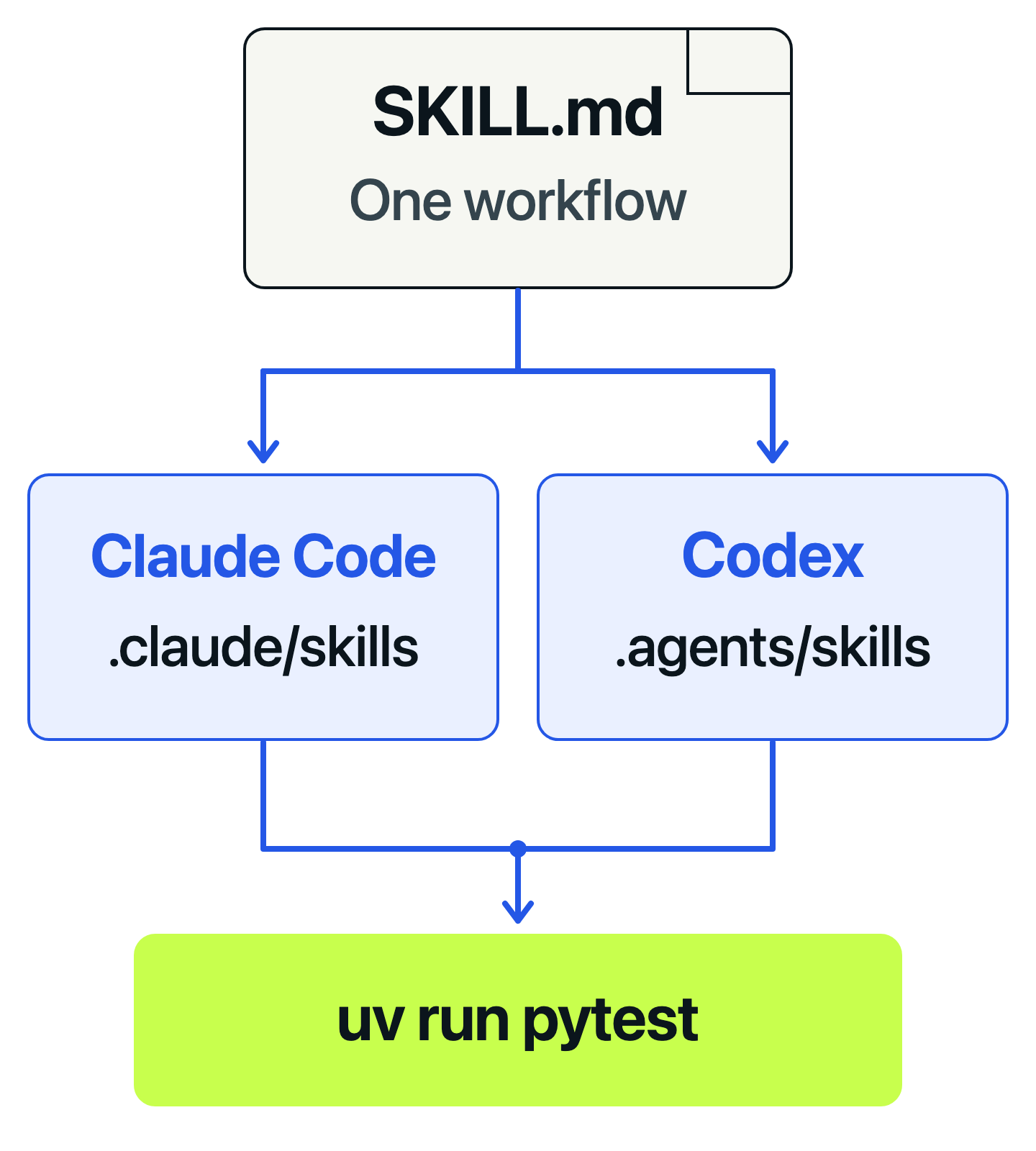
If the team uses both, keep the same skill contents in both locations and update them together. The simplest portable starting point is 2 identical files. Teams can later generate those copies from one maintained source if drift becomes a real problem.
When you are ready to use the skill, choose a known defect in your own project and state its expected behavior. Start a session at the project root. In Claude Code, begin the message with /behavior-first-pytest; in Codex CLI or the IDE extension, select $behavior-first-pytest, then supply the task. Explicit invocation makes the first trial easier to inspect than relying on automatic selection.
Judge its work by the evidence. Did it establish the requirement, show a meaningful failure before fixing the defect, preserve the justified expectation, and run the full pytest suite with coverage? In our retry example, that meant recognizing that completed attempt 3 must stop. Different test names or organization are fine if the contract is protected.
The Python examples and the skill’s format were checked during preparation. Agent behavior can vary, so treat a successful trial as evidence about that run, not a guarantee for every future task. Try a second bug with different behavior before making the skill a team default.
Does a testing skill replace CI?
No. A skill guides the agent; CI runs the tests independently. Use uv run pytest locally and in CI, then require its result before merging. The GitHub Actions pytest guide shows how.
08 / APPLY IT TO YOUR PROJECT
Improve the feedback loop before adding more instructions.
The retry example showed how a test can agree with broken code. An expectation taken from the requirement exposed the mistake. Pytest makes that disagreement visible, and coverage helps identify behavior the suite has not exercised. Reviewing the assertions tells us whether those checks protect something useful.
The skill preserves that sequence for the next task. It does not supply your product requirements, prove that all important behavior is implemented, or make a coverage percentage equivalent to correctness.
Start with one known defect in your own project. Give the agent the expected behavior, its source, and the relevant project commands. Watch where the workflow becomes unclear. Improve a repeated weakness with a focused instruction or a better executable check, rather than accumulating rules for every isolated mistake.
The broader guide to reliable work with AI coding agents connects this testing loop to planning, review, documentation, and production risks.
Build your testing judgment with the Pytest course, then use the same practices to review and improve AI-generated tests.
View courseMore field notes
Keep reading.
Test-Driven Development in Python with pytest: A Practical Guide
Build a seat-reservation rule one failing test at a time. Use pytest to see what is missing, protect rejected requests, and refactor with 4 passing cases.
Test-driven developmentpytestGitHub Actions Python Testing: A Complete pytest CI Guide
Run pytest automatically on GitHub pull requests. Start with 5 local tests, add reports and checks for supported Python versions, then block failing merges.
pytestGitHub ActionsAI Coding Agents: Best Practices for Reliable Software
AI coding agents make implementation faster. The harder question is how to trust the result as the software grows. Clear requirements, useful tests, and readable code give developers a way to keep control.
AI coding agentsproduction reliability