Python Unit Testing Best Practices: 10 pytest Rules
Write Python unit tests that survive refactoring. Use pytest to protect behavior, choose useful cases, control dependencies, and keep the suite fast.
Article summary
TL;DR
- Test results that callers depend on, so internal refactoring can leave the tests unchanged.
- Choose cases around boundaries and failures. Give repeated cases names that explain their purpose.
- Keep mutable test data fresh, and replace external services where the test needs control.
- Check mock calls against the real interface, then use broader tests for behavior the mock cannot establish.
- Use coverage to find gaps, and run the suite before merging. A passing test still needs a meaningful assertion.
Code for this article
Open the repository to follow along.
artem-istranin/istranin-dev-code-examples01 / TESTS WORTH KEEPING
Write tests that help you change the code.
You simplify a function, keep its result the same, and several tests fail. Later, a real bug reaches production even though the suite is green. Those problems point to different gaps: tests can depend too closely on implementation details while missing behavior that matters.
Python unit testing best practices help you decide what a test should protect. In this guide, we’ll apply 10 rules to 2 small examples: calculating a late fee and sending an overdue reminder. We’ll also change the code deliberately, so you can see which changes the tests accept and which they reject.
You’ll need basic Python and pytest. If test discovery and assertions are new to you, start with writing your first Python test.
What should a Python unit test check?
A Python unit test checks a focused piece of behavior with controlled inputs. That might involve a function, a class, or several closely related objects. Choose a boundary that lets the test describe a useful outcome without depending on unrelated systems.
For our fee calculation, the outcome is the amount charged. For the reminder, it’s whether the code asks an email gateway to send the right message. We can check that request without delivering a real email.
Run the finished examples
Use Git and uv to get the complete example package. It requires Python 3.13 or newer and includes locked pytest dependencies:
git clone https://github.com/artem-istranin/istranin-dev-code-examples.git
cd istranin-dev-code-examples/python-unit-testing-best-practices-pytest
uv sync --locked
uv run python -m pytest -q
uv sync --locked installs the versions recorded in the lockfile. The test command runs pytest in that environment; -q reduces its output. Expect 9 passed.
The calculation lives in fees.py; the account and reminder code live in reminders.py. Their tests are in tests/test_fees.py and tests/test_reminders.py, with shared setup in tests/conftest.py.
The snippets below explain those existing files. Don’t add duplicate tests when following along. We’ll mark the temporary edits and restore each before continuing.
02 / BEHAVIOR AND NAMES
Make the behavior clear before adding more cases.
Our fee rule is simple: charge 2 units per overdue day, up to a maximum of 20. Negative days are invalid. Here is fees.py:
def late_fee(days_overdue: int) -> int:
    if days_overdue < 0:
        raise ValueError("days overdue must not be negative")
    return min(days_overdue * 2, 20)
1. Test observable behavior
A caller needs the correct fee. The test should therefore call late_fee and check its result. It doesn’t need to know whether the function uses min, a conditional, or a private helper.
This test already exists in tests/test_fees.py, which imports late_fee from fees:
def test_late_fee_is_capped_after_ten_days() -> None:
    days_overdue = 14  # Given
    fee = late_fee(days_overdue)  # When
    assert fee == 20  # Then
Let’s check that it permits a harmless implementation change. In fees.py, temporarily replace the final return with:
    if days_overdue >= 10:
        return 20
    return days_overdue * 2
Keep the negative-input check. Run the fee tests:
uv run python -m pytest tests/test_fees.py -q
All 6 pass. The code now uses a conditional, but its public inputs and results haven’t changed. Restore return min(days_overdue * 2, 20) before continuing.
This gives the implementation room to change while preserving the behavior callers rely on. It doesn’t mean tests survive every refactor: changing a public function’s name or arguments can require updating its callers, including tests.
The refactoring exercise in the TDD guide shows the same principle when extracting a private helper.
2. Name the condition and expected result
test_late_fee_is_capped_after_ten_days tells you what the test protects. A name such as test_late_fee_3 makes you open the file before you can understand a failure.
Use the name to describe the scenario. Put detailed values in the test or its parameter rows. Avoid listing every implementation step in the name; those steps may change while the requirement stays the same.
3. Separate preparation, action, and assertion
The test above has 3 parts: choose 14 overdue days, calculate the fee, and check that it is 20. This pattern is often called Given-When-Then or Arrange-Act-Assert.
The comments make the structure visible here. In longer tests, blank lines can separate the same phases. The goal is to let a reader locate the action and expected result without tracing unrelated setup.
For examples a product team can review together, see behavior-driven development with pytest-bdd.
Several assertions can describe 1 outcome. For a reminder, checking that the function returns True and requests the expected email belongs in the same test. A later test shouldn’t depend on that email test having run first.
Practice writing clear pytest tests in the Python test automation course.
View course03 / CASES THAT MATTER
Choose cases that can expose different mistakes.
The 14-day case protects the cap, but it doesn’t establish the rest of the fee rule. We also need to know what happens before the cap and when the input is invalid.
4. Cover boundaries and failures
Choose cases around decisions in the requirements:
| Days overdue | Expected fee | What it checks |
|---|---|---|
| 0 | 0 | No charge when due today |
| 1 | 2 | The daily rate starts correctly |
| 10 | 20 | The calculation reaches the cap |
| 11 | 20 | The fee stops increasing |
The boundary between 10 and 11 matters because the fee changes from increasing to staying fixed. Testing only 1 and 5 days would leave that transition untested.
The FastAPI boundary-testing example applies the same idea to an order total at the free-shipping threshold.
Negative input has a different outcome: an exception. The example checks it separately:
def test_late_fee_rejects_negative_days() -> None:
    with pytest.raises(ValueError, match="must not be negative"):
        late_fee(-1)
pytest.raises checks the exception type. Its match argument searches the message using a regular expression. Here we check the meaningful phrase without fixing the entire sentence in place.
5. Parametrize cases with the same structure
Each table row performs the same action and assertion. In tests/test_fees.py, pytest represents them as 4 separately reported cases:
@pytest.mark.parametrize(
    ("days_overdue", "expected_fee"),
    [
        pytest.param(0, 0, id="due-today"),
        pytest.param(1, 2, id="one-day-overdue"),
        pytest.param(10, 20, id="at-cap"),
        pytest.param(11, 20, id="above-cap"),
    ],
)
def test_late_fee(days_overdue: int, expected_fee: int) -> None:
    assert late_fee(days_overdue) == expected_fee
The parameter names become test arguments. Each id gives its row a useful name in the result. Parametrization removes repeated test structure while keeping the inputs and expectations together.
For cases that also need reusable resources, see combining fixtures and parametrization.
Let’s see whether the suite detects a real mistake. In fees.py, temporarily change the cap from 20 to 22:
return min(days_overdue * 2, 22)
Run uv run python -m pytest tests/test_fees.py -q again. Expect 2 failed, 4 passed. The above-cap case and the 14-day test both report 22 == 20. The 10-day case still passes because 10 multiplied by 2 is already 20.
Restore the cap to 20 and rerun the command: 6 passed. The tests accepted a different implementation, then rejected a changed result. Both properties matter.
The separate 14-day test overlaps with the table to make this walkthrough easier to follow. In your own suite, combine cases when they share a clear rule. Keep a separate test when its setup, action, or expected failure tells a different story.
04 / FIXTURES
Share setup without sharing mutable state.
6. Make fixtures explicit and isolated
Our second example sends a reminder when an account has an outstanding balance. reminders.py represents the account with a small data class:
from dataclasses import dataclass


@dataclass
class Account:
    email: str
    balance_cents: int
A pytest fixture prepares something a test needs. The fixture in tests/conftest.py creates an account with a balance of 2,500 cents:
import pytest

from reminders import Account


@pytest.fixture
def overdue_account() -> Account:
    return Account(email="reader@example.com", balance_cents=2500)
A test requests it by declaring an argument named overdue_account. Pytest finds fixtures in conftest.py automatically; test files don’t import the fixture function.
The default fixture scope is function. Each test that requests this fixture gets a newly created account. If a test changes its balance, a later test doesn’t inherit that change.
The setup definition is reusable; the mutable account isn’t shared between tests. Widening the fixture’s scope to save a tiny construction cost would weaken that isolation for little benefit.
The guide to fixture scope and cleanup explores when sharing a resource is worth the tradeoff.
When should you use a pytest fixture instead of local setup?
Use a fixture when tests share meaningful preparation or need managed cleanup. Keep short, unique setup inside the test when that makes the scenario easier to read. A fixture is useful when it clarifies a dependency, not simply because pytest supports it.
Only 1 test currently requests overdue_account; the example shows where shared setup belongs as the suite grows. Writing that account directly in the test would also be reasonable. Tests for a settled account create their own data so the different starting balance stays visible.
Prefer explicit fixture arguments for scenario-specific setup. An autouse=True fixture runs for tests in its applicable scope without appearing in their arguments, which can make dependencies harder to notice.
05 / MOCKS AND BOUNDARIES
Replace the email gateway while testing the real decision.
7. Mock external collaborators with a checked interface
The reminder test should decide whether an email is requested. It shouldn’t need a mailbox or a running email service. reminders.py accepts the gateway as an argument, so the test can supply a replacement:
class EmailGateway:
    def send(self, recipient: str, subject: str) -> None:
        raise NotImplementedError


def send_overdue_reminder(
    account: Account,
    gateway: EmailGateway,
) -> bool:
    if account.balance_cents <= 0:
        return False

    gateway.send(
        recipient=account.email,
        subject="Payment overdue",
    )
    return True
EmailGateway defines the method our reminder expects. It doesn’t implement email delivery. Passing the gateway into the function is a simple form of dependency injection: the caller supplies the collaborator instead of the function constructing it internally.
A mock is a replacement that can record calls and provide controlled responses. The test uses Python’s create_autospec to build a mock from EmailGateway:
from unittest.mock import create_autospec

from reminders import Account, EmailGateway, send_overdue_reminder


def test_sends_reminder_for_overdue_account(overdue_account: Account) -> None:
    gateway = create_autospec(EmailGateway, instance=True)

    sent = send_overdue_reminder(overdue_account, gateway)

    assert sent is True
    gateway.send.assert_called_once_with(
        recipient="reader@example.com",
        subject="Payment overdue",
    )
This is the positive reminder test in tests/test_reminders.py. instance=True makes the mock represent a gateway instance. The real account and reminder function still run; only the gateway is replaced.
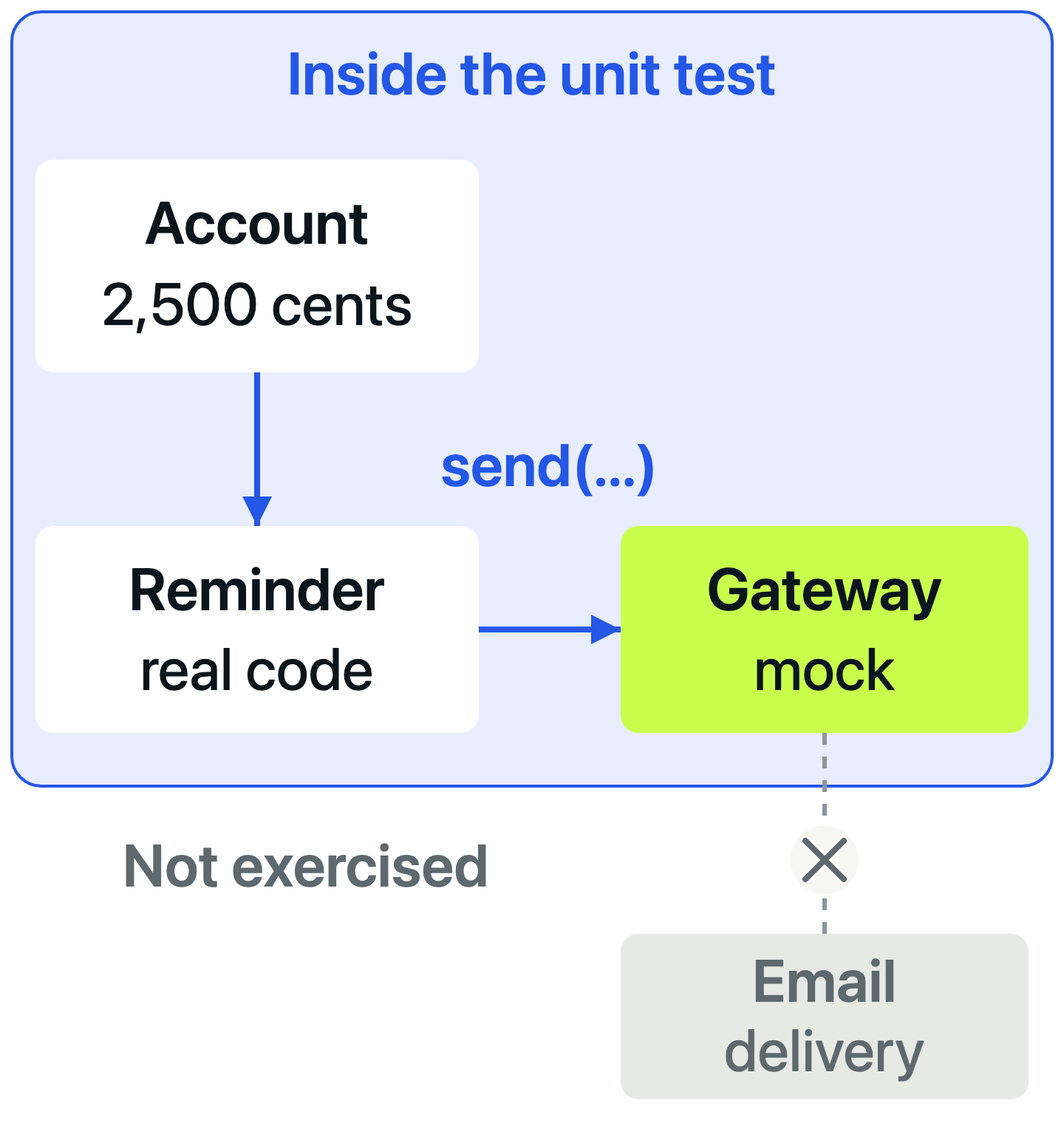
The first assertion checks the reported outcome. The second checks that the function requests exactly 1 email with the expected recipient and subject. Checking this interaction makes sense because sending a request is the behavior we’re protecting.
What does autospec catch in a Python mock?
create_autospec creates a mock that checks calls against the specified object’s interface. It can reject a method call with missing or incorrect arguments. It doesn’t validate type annotations or prove that the real dependency performs the requested operation.
Try an invalid call. In reminders.py, temporarily change recipient=account.email to address=account.email. Keep the test unchanged and run:
uv run python -m pytest tests/test_reminders.py::test_sends_reminder_for_overdue_account -q
The test fails with:
TypeError: missing a required argument: 'recipient'
The mock rejects the call because send requires recipient; an argument named address doesn’t satisfy it. This happens when the function calls the gateway, before the test reaches its assertions.
Restore recipient=account.email and run uv run python -m pytest -q. All 9 tests pass again. The complete package also checks balances of 0 and -100: neither should request an email.
Autospec reduces the risk of a replacement accepting calls that the defined interface would reject. It still uses our EmailGateway definition as its source. A real delivery implementation could have different behavior or integration problems. The pytest mocking tutorial explores replacement targets and mock drift in more detail.
06 / SCOPE AND STABILITY
Test each risk at a boundary that can expose it.
8. Choose the test level for the question
Our unit tests establish the fee calculation and the reminder’s decision. They don’t establish that an email provider accepts a request, or that a scheduled job finds the right overdue accounts.
These questions need different amounts of real application code:
| Question | Useful test boundary |
|---|---|
| Is the fee capped at 20? | Unit test calling late_fee |
| Does an outstanding balance trigger a reminder request? | Unit test with a controlled gateway |
| Does our delivery adapter communicate correctly with a test email service? | Integration test using the real adapter |
| Can the complete overdue-reminder workflow reach a test inbox? | End-to-end test through the application’s entry point |
The last 2 rows describe extensions to a larger application. This example package contains neither a delivery adapter nor a complete reminder workflow.
The unit, integration, and E2E comparison follows 1 Python application through all 3 boundaries.
Start with the narrowest boundary that can detect the mistake you care about. Add broader checks for wiring and external behavior. A large collection of unit tests cannot establish a connection those tests never exercise.
Choose a test boundary that includes the source of risk. A precise assertion cannot detect behavior that the test never runs.
9. Control inputs that change between runs
A flaky test sometimes passes and sometimes fails without an intended change to the behavior under test. Time, shared state, unpredictable data, and unfinished background work can all contribute.
Our examples choose the overdue days and account balance directly. They don’t read today’s date or fetch a balance from a shared account. That keeps the reason for each expected result visible.
In a larger project, apply the same idea at the relevant boundary. Pass a chosen time into a calculation instead of reading the clock inside it. Use pytest’s tmp_path for a test’s temporary files. Use monkeypatch to change an environment variable with automatic restoration after the test.
For randomized tests, record enough information to reproduce a failure. For background work, wait for a meaningful completion condition with a timeout. An arbitrary sleep can be too short on a busy machine and waste time when the work finishes quickly.
If a test fails intermittently, investigate the changing input or dependency. Retrying until it passes doesn’t explain the failure or establish that the behavior is correct.
07 / COVERAGE AND CI
Use coverage to find questions the suite hasn’t answered.
10. Combine coverage with regular execution
Code coverage shows which code ran during the tests. Branch coverage also measures alternative paths through decisions. Neither measurement tells you whether the assertions were strong enough to detect an incorrect result.
The example includes pytest-cov. Run its report from the same project directory:
uv run python -m pytest --cov=fees --cov=reminders --cov-branch --cov-report=term-missing
The 2 --cov options select our application modules. --cov-branch includes decision paths, and term-missing prints uncovered line numbers. The pytest-cov reporting documentation explains the other output formats.
With the unchanged example, all 9 tests pass and the combined report shows 95% coverage. fees.py has 100%; reminders.py has 93%. The uncovered line is the gateway’s raise NotImplementedError, which isn’t called when the test supplies a mock.
That gap explains a limit of the example. It isn’t evidence that another test should invoke an intentionally unimplemented method just to raise the percentage.
What is a good coverage target for Python unit tests?
Choose a coverage target that supports your project’s risks and maintenance needs. A percentage can help prevent coverage from shrinking, but it doesn’t prove that important behavior is protected. Review missing paths and the assertions around critical rules before choosing a threshold.
The fee-cap exercise gives evidence that coverage alone cannot: changing the cap to 22 caused a failure. Both versions execute the same return statement. The expected value is what lets the test distinguish them.
Run the suite before merging
Continuous integration (CI) runs checks automatically as changes are brought together. Start with the same dependency setup and test command that work locally. Make a passing result a required check if a failing suite should block a merge.
Keep failures visible and investigate them before changing expectations. The example package has no coverage percentage gate; add one to your project when you have decided what it should protect.
Use the GitHub Actions pytest guide to build the workflow, save reports, and require passing checks before merging.
08 / APPLY THE RULES
Improve the next test you need to maintain.
Should you use pytest or unittest for Python unit testing?
Both can check the same application behavior. unittest is included in Python and organizes tests around TestCase classes. Pytest supports plain test functions, fixtures, and parametrization, which keep the examples in this guide compact.
Pytest can also run existing unittest.TestCase tests. Those methods cannot directly receive pytest fixture arguments or use pytest parametrization, so mixing styles has limits. The pytest unittest documentation explains the supported features.
Choose the conventions that fit your project. Changing frameworks won’t fix a test that checks the wrong outcome or depends on another test’s state.
Review a test with these questions
The fee tests accepted a harmless refactor and caught a changed cap. The reminder test checked a real decision while replacing email delivery, and autospec rejected an invalid call. Those are useful properties to look for in your own suite.
When adding or repairing a test, ask:
- What behavior should this test protect?
- Can its name and assertions explain the expected result?
- Which boundary or failure case could expose a mistake?
- Does its setup depend on another test or an uncontrolled input?
- Would a plausible bug make it fail, and would a harmless implementation change keep it passing?
Start with a test you already need to change. Make its scenario clearer, add the missing case, and run it alongside the rest of the suite. You don’t need to reorganize every test before improving the next one.
Build on these examples with the Pytest Python test automation course.
View courseMore field notes
Keep reading.
Pytest Fixtures and Parametrization Best Practices
Reuse pytest setup without hiding what each test checks. Follow an inventory example through fixtures, parameter tables, failures, and fresh test data.
pytestPython testingUnit Testing vs Integration Testing vs E2E: Python Examples
Follow one Python converter through unit, integration, and end-to-end tests. Break its calculation, configuration, and output to see why each boundary matters.
Python testingpytestGitHub Actions Python Testing: A Complete pytest CI Guide
Run pytest automatically on GitHub pull requests. Start with 5 local tests, add reports and checks for supported Python versions, then block failing merges.
pytestGitHub Actions