Unit Testing vs Integration Testing vs E2E: Python Examples
Test one Python unit converter at three boundaries: its calculation, real configuration, and installed command. See what each level catches and how to choose a useful mix.
Article summary
TL;DR
- Unit tests check focused rules; integration tests check real components together; E2E tests exercise a complete workflow through its external entry point.
- A correct calculation can coexist with broken configuration or command output. Tests at different boundaries expose different failures.
- Acceptance and regression describe a test’s purpose. Either can be checked at more than one testing level.
- Choose your test mix by risk, feedback speed, and maintenance. Starting with E2E tests does not require keeping an E2E-heavy suite.
- AI can help generate workflow tests, but expected outcomes still need an independent requirement and generated repairs still need review.
01 / COMPARISON
Unit, integration, and end-to-end testing: what changes?
Your calculation tests pass, but the command still prints the wrong answer. The formula is correct; the application loaded the wrong conversion settings. A test that only calls the formula cannot catch that mistake.
The difference between unit testing, integration testing, and end-to-end (E2E) testing is the boundary of the test: how much real software runs between its input and its assertion.
We’ll test one Python unit converter at all three levels. The requirement stays the same: a user converting 25 degrees Celsius to Fahrenheit should receive 77. Each test checks a different part of the path to that result.
| Test level | Question it answers | Boundary in this example | Failure it can expose |
|---|---|---|---|
| Unit | Does this focused piece of behavior work? | Conversion function with unit definitions supplied by the test | Incorrect temperature calculation |
| Integration | Do these real components work together? | Packaged JSON, loader, and conversion function | Incorrect settings or a mismatch between loaded data and code |
| E2E | Can a user complete this workflow through the application’s entry point? | Installed terminal command, configuration, calculation, and output | Broken command wiring, exit status, or terminal output |
A boundary is simply where the test enters the software and where it observes the result. Calling a function and launching an installed command enter at different boundaries, even when both expect 77.
You don’t need to memorize a universal list of labels. Teams use these terms somewhat differently. Describe which components are real, which dependencies are replaced, and which result you check; that description makes a test’s scope clear.
The testing pyramid gives this change in scope a visual shape. Read it from the bottom up: an individual component, an interaction between components, then a complete workflow. The pink outlines on the right show how much of the connected system each test includes.
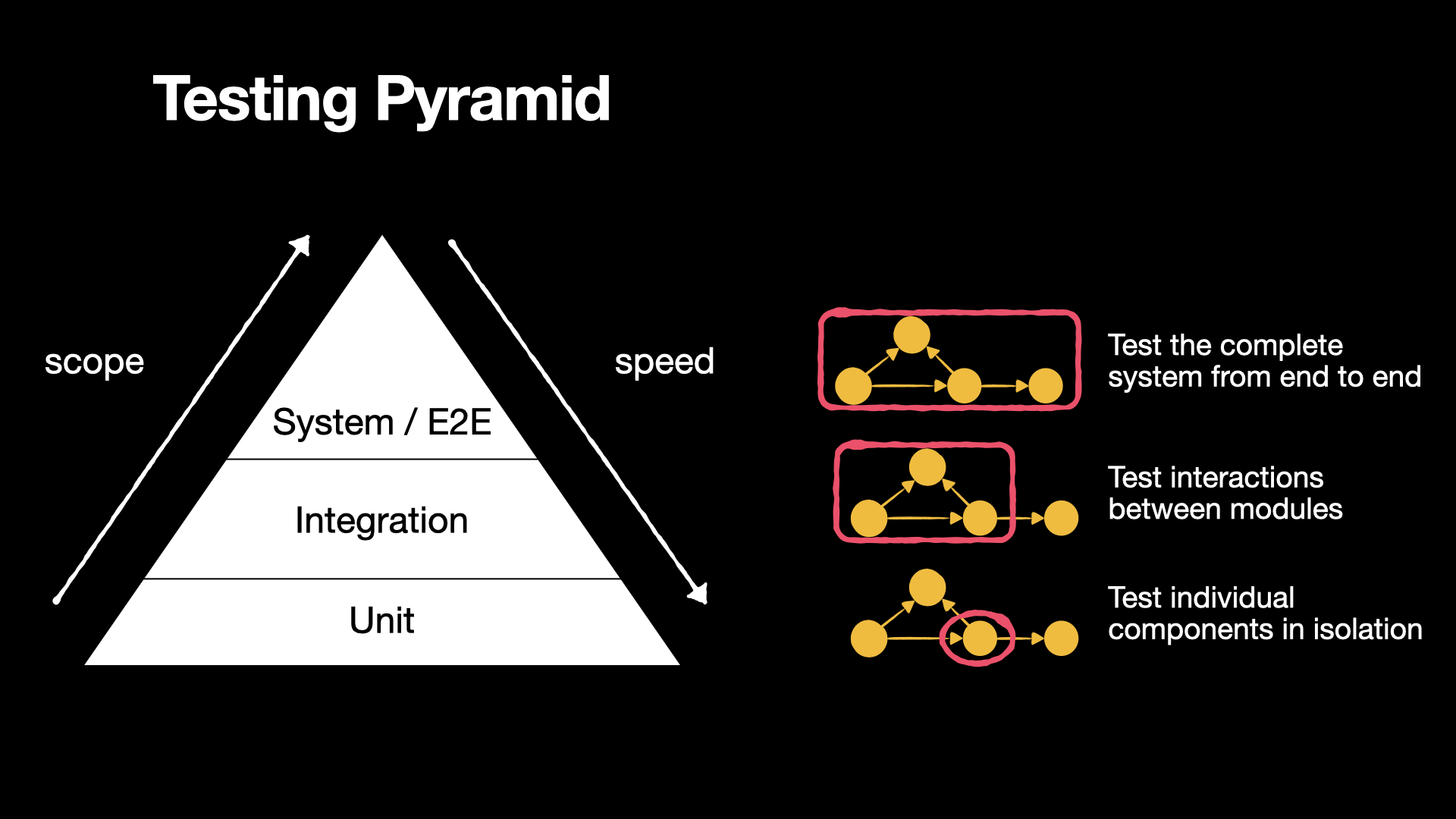
Scope increases toward the top; focused tests toward the bottom are typically faster because they need less setup and involve fewer dependencies. The diagram groups system and E2E tests for this overview. We’ll clarify their boundaries in the E2E example, then return to the pyramid when choosing a test mix.
Learn Python test automation step by step, from testing fundamentals to advanced pytest. Explore the course and enroll.
View course02 / RUN THE EXAMPLE
Run the Python example
The complete testing-levels example adapts the unit converter from my pytest course. It keeps the calculation small so we can concentrate on the tests.
You’ll need Git and uv, which manages Python and the project’s dependencies. The example uses Python 3.13, pytest to discover and run tests, and Typer to build the command-line interface.
git clone https://github.com/artem-istranin/istranin-dev-code-examples.git
cd istranin-dev-code-examples/unit-integration-e2e-testing-python
uv sync --locked
uv run units-convert 25 C F
uv run pytest -v
uv sync --locked installs the project and the dependency versions recorded in uv.lock. It also makes the units-convert command available inside the project’s environment. The conversion prints 77; the test command runs 18 cases. Run the remaining commands from this same directory.
This is an editable development installation: the installed command uses your checked-out source, so changes to that source take effect on the next run.
Here is the structure that matters for the walkthrough:
src/unit_converter/
  converter.py       # Unit definitions and conversion rules
  units.json         # The application's supported units
  registry.py        # Loads those definitions from JSON
  cli.py             # Connects terminal input to conversion and output
tests/
  unit/
  integration/
  e2e/
The command follows this path:
terminal arguments -> load units.json -> convert value -> terminal result
This is a complete, small application. It has no database or remote service. That makes it possible to test its whole user workflow without introducing browser automation first.
03 / UNIT TESTING
Unit tests check a focused rule
A unit test exercises a small, cohesive piece of behavior with controlled inputs. A unit might be a function, a class, or a few closely related objects. It doesn’t have to mean exactly one function or require mocking every other object.
Our Unit object holds three values: its dimension, scale, and offset. A dimension is a category such as length or temperature; converting length to mass is invalid.
Each dimension has a base unit. Temperature uses Celsius, so Fahrenheit is described by fahrenheit = celsius * 1.8 + 32. Length uses meters, so centimeters have a scale of 100 and an offset of 0.
The conversion code in src/unit_converter/converter.py is:
from dataclasses import dataclass


@dataclass(frozen=True)
class Unit:
    """Describe a unit as unit_value = base_value * scale + offset."""

    dimension: str
    scale: float = 1.0
    offset: float = 0.0

    def __post_init__(self) -> None:
        if self.scale <= 0:
            raise ValueError("Unit scale must be positive")


def convert(value: float, source: Unit, target: Unit) -> float:
    """Convert compatible units through their shared base unit."""
    if source.dimension != target.dimension:
        raise ValueError("Cannot convert between different dimensions")

    base_value = (value - source.offset) / source.scale
    return base_value * target.scale + target.offset
@dataclass generates the initializer for this small data object; frozen=True prevents ordinary field reassignment. __post_init__ checks the scale after construction. You can treat Unit(...) as a named container for the conversion settings.
The function first translates the source value back to its base unit, then translates that base value into the target unit. For example, converting 77 Fahrenheit back to Celsius starts with (77 - 32) / 1.8 = 25. The function knows nothing about JSON files or terminal arguments.
In tests/unit/test_converter.py, the first test provides the unit definitions directly:
import pytest

from unit_converter.converter import Unit, convert


def test_celsius_to_fahrenheit():
    celsius = Unit(dimension="temperature")
    fahrenheit = Unit(dimension="temperature", scale=1.8, offset=32)

    result = convert(25, celsius, fahrenheit)

    assert result == pytest.approx(77)
The three parts are arrange, act, and assert: prepare the inputs, perform the conversion, and check the result. pytest.approx allows a small numeric tolerance because floating-point arithmetic can introduce rounding differences.
No file is read here. If this test fails, the investigation is focused on the calculation or its supplied definitions. If it passes, we know the function works for these inputs. We haven’t checked which definitions the application actually loads.
Run just this level:
uv run pytest tests/unit -v
The unit suite also covers reverse temperature conversion, zero and negative values, and incompatible dimensions. These are useful cases to explore through a small boundary: there’s no need to launch a process for every arithmetic variation.
04 / INTEGRATION TESTING
Integration tests check real components together
An integration test checks a selected interaction using the real components involved. Here we expand from the calculation to the path that reads application configuration and turns it into usable Unit objects.
Working with several real objects alone doesn’t settle the label. Our unit test treats Unit and convert as one small calculation module. This integration test adds the application’s file-loading boundary. Other integration tests might connect application code to a database or a service client to a test server.
Our application stores its supported units in src/unit_converter/units.json:
{
  "m": {"dimension": "length", "scale": 1},
  "cm": {"dimension": "length", "scale": 100},
  "kg": {"dimension": "mass", "scale": 1},
  "g": {"dimension": "mass", "scale": 1000},
  "C": {"dimension": "temperature", "scale": 1},
  "F": {"dimension": "temperature", "scale": 1.8, "offset": 32}
}
The loader in src/unit_converter/registry.py reads that file and creates Unit objects:
import json
from importlib.resources import files

from unit_converter.converter import Unit


def load_units() -> dict[str, Unit]:
    """Read packaged JSON without relying on the current working directory."""
    text = files("unit_converter").joinpath("units.json").read_text(encoding="utf-8")
    definitions = json.loads(text)
    return {symbol: Unit(**definition) for symbol, definition in definitions.items()}
importlib.resources finds the file inside the installed Python package. This matters because a user can run the command from any directory. Unit(**definition) passes a JSON object’s keys as named arguments, such as dimension="temperature" and scale=1.8.
Now the test in tests/integration/test_registry_conversion.py uses the real loader:
import pytest

from unit_converter.converter import convert
from unit_converter.registry import load_units


def test_packaged_temperature_conversion():
    units = load_units()

    result = convert(25, units["C"], units["F"])

    assert result == pytest.approx(77)
The expected answer is still 77, but the test now crosses a boundary the unit test skipped. It checks that the application’s real configuration can be loaded and produces the correct conversion through the real calculation code.
Change Fahrenheit’s JSON offset from 32 to 0, and this integration test fails. The earlier unit test still passes because it supplies its own correct definition. These tests provide different evidence despite sharing the same expected answer.
A test double is a replacement dependency supplied by a test. Stubs return prepared answers; mocks can also check how they were called. Replacing load_units() with a double returning perfect data would remove the particular integration we want to verify here. In another integration test, replacing an unrelated payment service could be sensible. Keep the interaction under examination real.
uv run pytest tests/integration -v
This test uses a real local file and still runs quickly. Speed is a practical consequence of the dependencies involved, not a reliable way to classify a test. There is no universal millisecond threshold separating unit and integration tests.
05 / E2E TESTING
E2E tests exercise the user’s entry point
An end-to-end test follows a workflow through the application’s external entry point and observes its result. For a website, that may mean a browser interacting with the frontend, backend, and database. For our converter, the entry point is a terminal command.
The CLI layer parses the three arguments, loads the units, calls convert, and prints the answer. Successful conversions return exit code 0. Unknown units or incompatible dimensions produce an error message and exit code 1.
The connection starts in pyproject.toml:
[project.scripts]
units-convert = "unit_converter.cli:app"
This registers units-convert as a command that runs the Typer app object in unit_converter/cli.py. Calling convert directly would bypass that registration and the command’s argument handling.
The test in tests/e2e/test_cli.py launches that installed command:
import shutil
import subprocess

import pytest


@pytest.mark.acceptance
def test_weather_conversion_from_terminal(tmp_path):
    command = shutil.which("units-convert")
    assert command is not None, "Install the project with uv sync --locked"

    result = subprocess.run(
        [command, "25", "C", "F"],
        cwd=tmp_path,
        capture_output=True,
        text=True,
        timeout=10,
        check=False,
    )

    assert result.returncode == 0, result.stderr
    assert result.stdout.strip() == "77"
    assert result.stderr == ""
shutil.which finds the executable on the command search path. subprocess.run starts it in a separate process. We check its exit status and its two output streams: stdout for the successful result and stderr for errors.
Pytest supplies tmp_path, a unique temporary directory. Launching the command there verifies that the application can find its configuration without depending on the repository being the current directory. The timeout prevents a stuck command from hanging the suite indefinitely; check=False lets the assertions inspect the exit code themselves.
The acceptance marker labels this test’s purpose. We’ll separate purpose from level in the next section.
uv run pytest tests/e2e -v
The full file also checks invalid conversions. E2E tests can cover important failures, such as a payment rejection or an access denial; they aren’t restricted to successful journeys. The question is which failures deserve verification through the whole workflow.
Where system testing and packaging fit
System testing checks a complete system against its requirements. E2E testing emphasizes a complete workflow across the components involved. For this self-contained CLI, the subprocess test fits both descriptions. In a larger product, the defined system under test might be one service; a system test covers that service, while an E2E workflow may continue through several services.
State the boundary rather than relying on the label alone. Typer’s CliRunner, for example, can exercise command parsing and application code inside the test process. It is useful, but it doesn’t verify launching the installed executable. Similarly, a browser test with every backend response stubbed doesn’t check that the real frontend and backend work together.
Launching the development installation doesn’t prove that a release package includes its data files. The example README includes a separate wheel check; a wheel is a built Python package ready to install. Deployment and release artifacts need their own verification when those boundaries matter.
06 / LEVEL AND PURPOSE
Test level and test purpose are different
The first diagram showed how much of the application a test exercises. Now keep those same levels and ask why the test exists. Acceptance and regression describe that purpose.
| Purpose | What the test establishes | Possible level |
|---|---|---|
| Acceptance | An agreed requirement is satisfied | Unit, integration, or E2E, depending on the requirement |
| Regression | Previously working behavior still works after a change | Any level where a useful failure can be detected |
For example, “reject a conversion from length to mass” is an acceptance criterion we can check directly at the unit level. “A user can convert the weather temperature through the terminal” needs the CLI workflow. Both can also serve as regression protection in later changes.
User acceptance testing (UAT) usually adds evaluation by users or business representatives. An automated E2E test can supply evidence for acceptance, but running it doesn’t by itself establish that those people have accepted the product.
The next illustration adds purpose to the same pyramid. On the left, regression checks protect working behavior as the code changes. On the right, acceptance checks compare the software with user requirements. The arrows show a common emphasis: many focused regression checks and broader acceptance scenarios. Both purposes can still be served at any level.
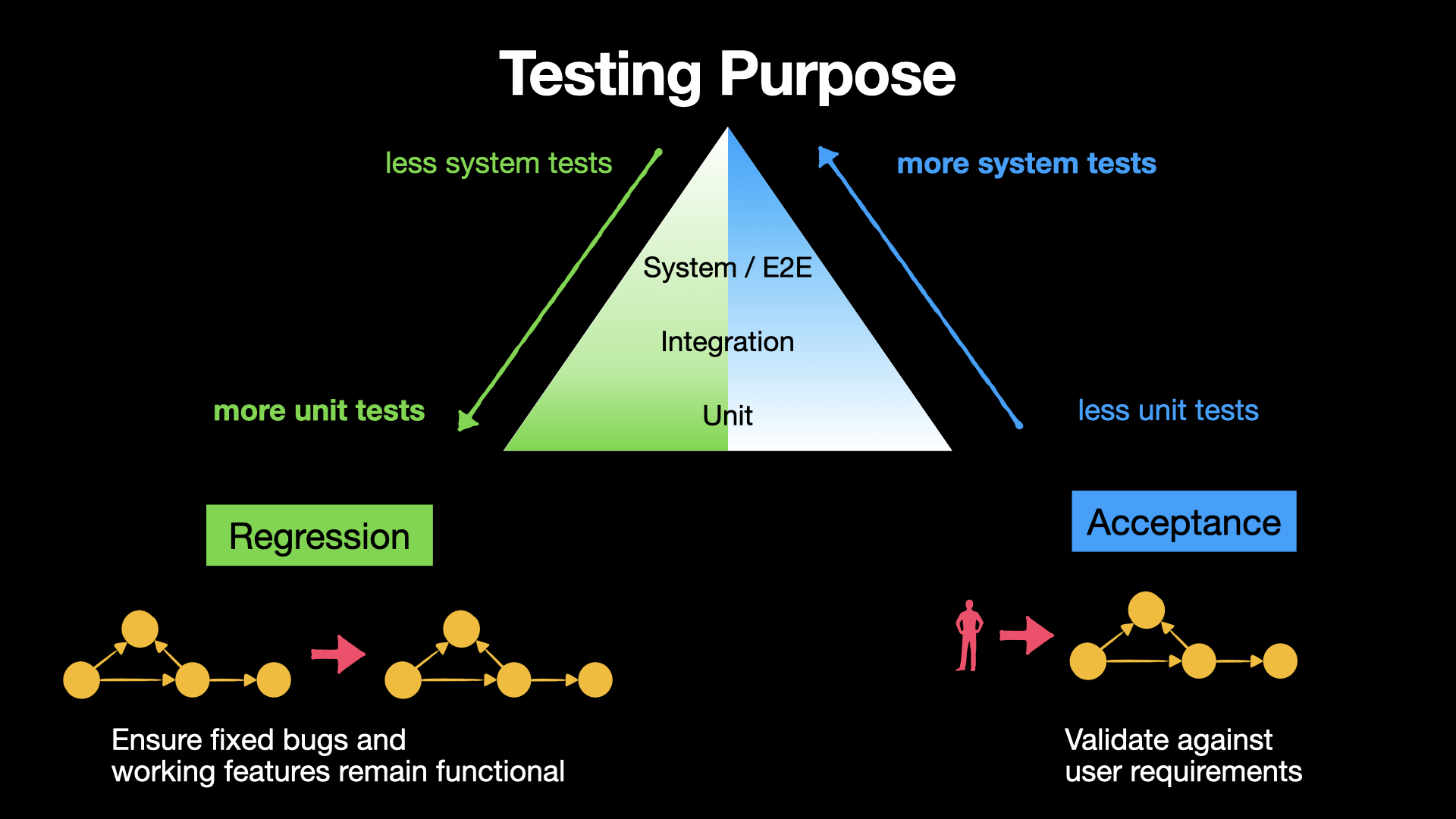
In pytest, folders can describe levels while custom markers describe purposes. This project’s pyproject.toml registers acceptance and regression, so you can select them independently of their directory:
uv run pytest -m acceptance -v
uv run pytest -m regression -v
The acceptance selection spans unit and E2E tests. The regression selection exercises reverse-temperature conversions, including the offset defect demonstrated in the README. Unmarked tests can still provide regression protection; a marker helps select tests, not determine everything they can prove.
Connect those purposes to TDD and BDD
The third illustration adds development approaches to the levels and purposes we’ve already seen. It connects the tests we keep with the process that helps us create them.
Test-driven development (TDD) uses a short cycle: write a failing test, make it pass, then refactor while the tests stay green. Those tests become regression protection as the application changes. For our converter, we could first write a failing test for 77 F -> 25 C, fix the missing source-offset subtraction, and keep the test to prevent that mistake from returning.
Behavior-driven development (BDD) starts with a shared understanding of desired behavior. The team discusses concrete examples and agrees on expected outcomes before automating them. Those examples provide acceptance criteria. In our converter, “a user enters 25 Celsius in the terminal and receives 77 Fahrenheit” gives the E2E acceptance test its expected result.
One way to express that example is Given-When-Then: Given the standard Celsius and Fahrenheit definitions, When a user converts 25 Celsius through the terminal, Then the command prints 77 and succeeds.
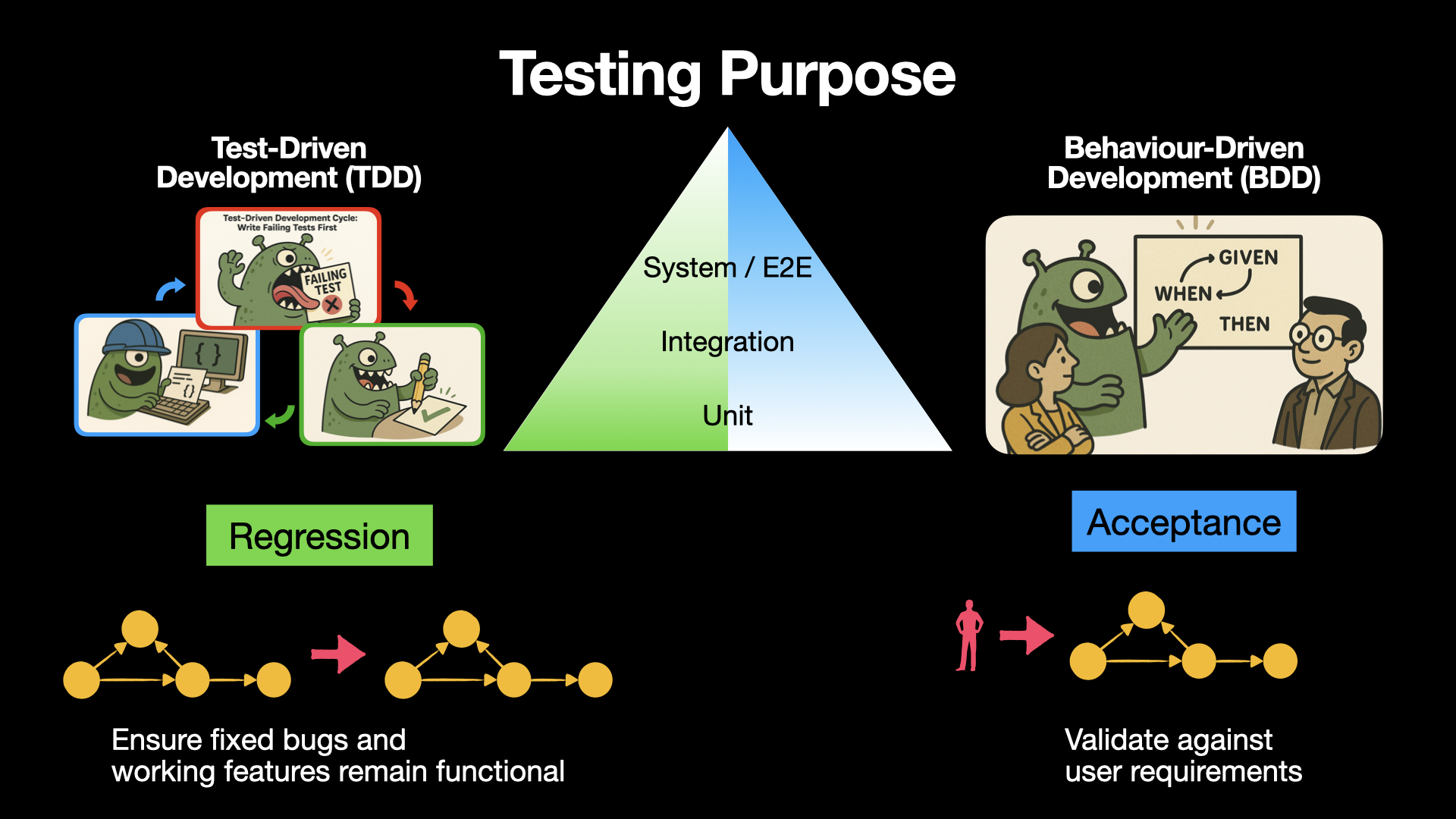
These are useful connections, not exclusive categories. TDD can guide new features as well as bug fixes, and BDD examples can be checked at different levels. A test agreed through BDD can also protect against later regressions. The development approach helps create the test; its level describes scope, and its purpose explains why we keep it.
07 / TESTING PYRAMID
Use the testing pyramid to choose a useful mix
The testing pyramid encourages a broad foundation of focused tests, a smaller integration layer, and a narrower set of complete workflows. Its practical concern is feedback: broad tests often involve more setup and more possible causes of failure. Martin Fowler’s description also acknowledges that the balance can change when broad tests are fast, reliable, and inexpensive to maintain.
For our converter, divide the work by the question each test needs to answer:
- Unit tests: does the calculation handle different inputs? Check zero, negative, and fractional values, plus conversions in both directions. These cases run directly against the calculation without loading files or starting the command.
- Integration tests: does the application load the right conversion rules? Load the real unit definitions and check representative temperature, length, and mass conversions.
- E2E tests: can someone use the command successfully? Check that entering
25 C Fprints77, and that trying to convert meters to kilograms produces a clear error and a failure exit code.
You don’t need to repeat every calculation through the terminal. Keep the detailed input variations in unit tests, then use integration and E2E tests to check the additional responsibilities: loading the real definitions and completing the user’s workflow.
Some overlap is useful. Testing 25 C -> 77 F at each level checks the calculation, the configured units, and the command that connects them. What you avoid is repeating the entire calculation test suite through that command.
There is no required 70/20/10 split. An application with complex pricing rules may need many focused calculation tests. A service dominated by database queries may gain more from integration tests against its real database engine. Kent C. Dodds’ testing trophy gives integration testing more emphasis; it is a different strategy from making E2E tests the largest layer.
Run fast, reliable checks on each pull request, including critical E2E workflows when practical. Larger environment or browser matrices may run separately. Decide using measured runtime, intermittent failures, and the cost of delaying feedback. A test is flaky when it can pass or fail without a relevant change to the behavior being tested.
08 / AI AND E2E-FIRST
Bonus: does AI make E2E-first testing a better starting point?
AI tools make it easier to explore an E2E-first approach. For example, Playwright’s test agents can plan scenarios, generate browser tests, and propose repairs to failing tests. That capability makes it reasonable to reconsider how much effort a small team needs to establish its first workflow checks.
Recent vendor arguments, including Autonoma’s E2E-first proposal, go further and favor an inverted pyramid: a suite that emphasizes broad E2E workflows over focused tests. Treat that as a strategy to evaluate in your project. A vendor’s claim that maintenance costs have nearly disappeared is not evidence that your tests will have those economics.
There are two separate decisions here: which tests to write first and what mix to maintain as the project grows.
Starting with a few broad tests can be useful when inheriting a tightly coupled application with little coverage. You may be able to protect an important workflow before the code is easy to test in smaller pieces. That is also the practical argument I raised in this discussion about which testing level to start with.
The idea predates current AI tools. In Martin Ivison’s 2019 case study, a team began with broad tests around a legacy system, limited that layer, and added API and lower-level tests. It illustrates an order for introducing protection, not a requirement to keep expanding the E2E layer indefinitely.
For a new product, a complete workflow can also reveal missing wiring early. For a calculation library, focused tests may give useful feedback sooner. Project structure, existing coverage, team skills, and the consequences of a missed defect matter more than choosing a fashionable shape.
AI can help write the test; the expected behavior still needs a source
Suppose you ask an agent to create an E2E test for our converter. Give it the requirement 25 C -> 77 F, the expected success status, and the output stream. If it merely runs the current program and copies its answer into the assertion, a wrong implementation can become the test’s definition of correct behavior.
On legacy code, recording existing behavior can still be useful. These are often called characterization tests: they make behavior changes visible during a refactor. Review whether the recorded behavior is actually desired before treating it as an acceptance requirement.
AI may reduce authoring work, but it doesn’t remove process startup, database preparation, network latency, environment availability, or failure investigation. A generated repair also needs review: changing an expected answer or skipping a failing test can hide a product defect.
My starting approach would be:
- Agree on one important workflow and its expected result before generating a test.
- Use AI to draft and run a test through that real boundary.
- Introduce a relevant defect temporarily and confirm that the test fails for the right reason.
- Add focused tests for complicated rules and integration checks for risky connections.
- Review runtime, failures, and maintenance before expanding the broad suite.
The examples and review questions in writing Python tests with AI go deeper into keeping generated assertions tied to requirements.
Try the same decision process locally: change Fahrenheit’s offset in units.json from 32 to 0, then run the three test directories separately. Restore it afterward. Explain why one level stays green while two turn red. Once you can do that, you can choose a test level by the failure it must detect, rather than by the folder name or the tool that wrote it.
More field notes
Keep reading.
Test-Driven Development in Python with pytest: A Practical Guide
Use pytest to practice red-green-refactor on a realistic inventory rule. Write each failing test first, add only enough code, and refactor safely.
Test-driven developmentpytestBehavior-Driven Development in Python with pytest-bdd
Continue the TDD seat-reservation example with BDD. Agree on customer outcomes, write Gherkin scenarios, and run them against the same Python inventory with pytest-bdd.
Behavior-driven developmentpytest-bddHow to Guide AI Coding Agents to Write Better pytest Tests
AI agents often test the line they changed instead of the behavior a unit owns. Add durable testing instructions, enforce a pytest coverage gate, and review generated tests against stable contracts.
pytestAI coding agents